Telinfy MCP Server -Technical Documentation
Overview
Telinfy MCP Server provides programmatic access to Telinfy's communication platform through the Model Context Protocol (MCP). It enables AI assistants to send SMS, WhatsApp, and RCS messages, manage phonebook contacts, and retrieve campaign analytics on behalf of authenticated users.
Server Details
Property
Value
Authentication OAuth 2.0 Flow
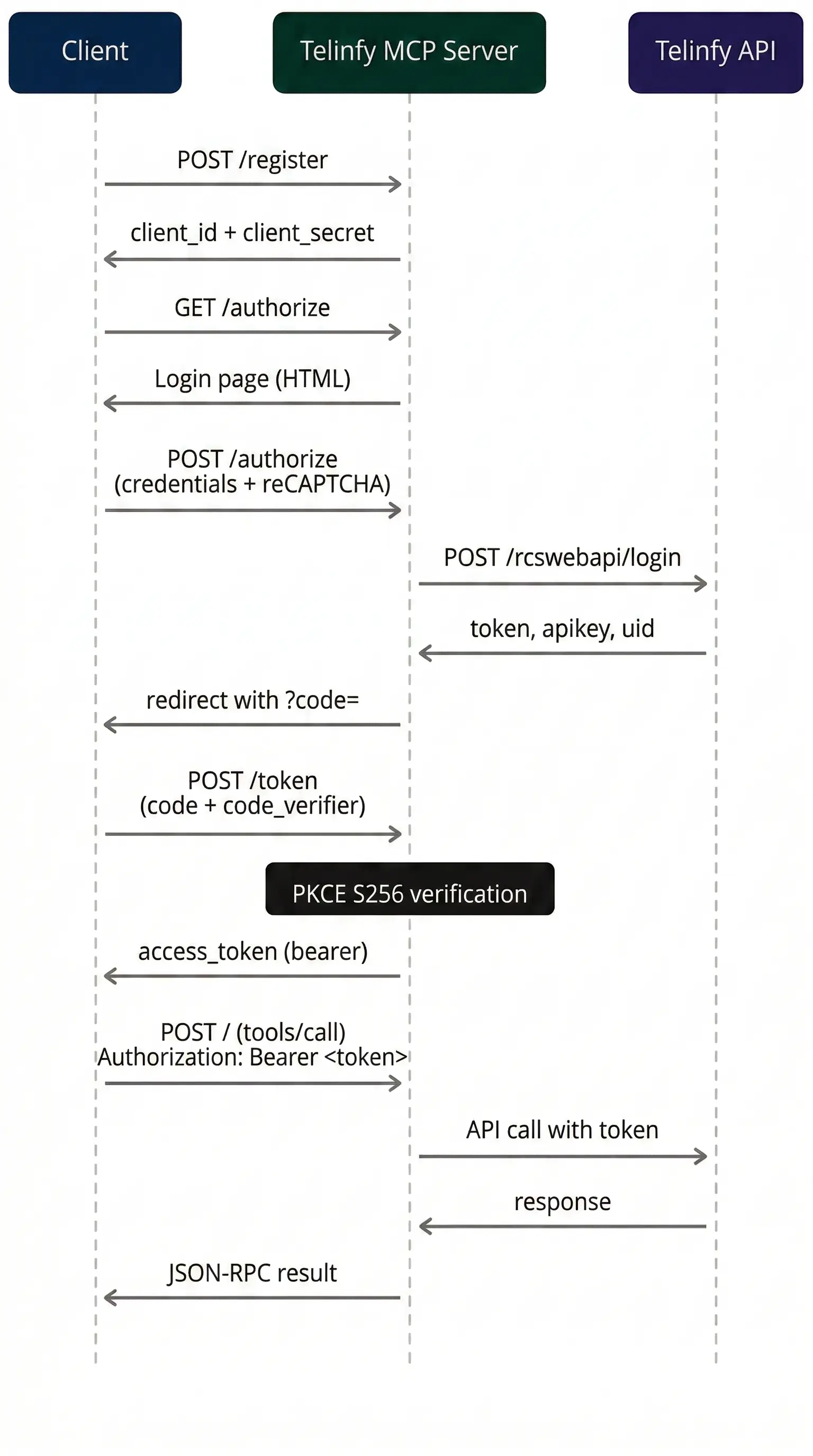
Discovery Endpoints
Endpoint
Method
Description
Allowed Redirect URIs
- https://claude.ai/api/mcp/auth_callback
- https://claude.com/api/mcp/auth_callback
MCP Endpoints
Method
Path
Auth Required
Description
Tools
SMS
send_sms
Send SMS messages through bulk SMS gateway with DLT compliance.
Annotations: readOnlyHint: false, destructiveHint: true
Parameter
Type
Required
Description
schedule_sms
Schedule an SMS campaign for future delivery.
Annotations: readOnlyHint: false, destructiveHint: true
Parameter
Type
Required
Description
scheduleDynamicCampaign
Schedule a dynamic SMS campaign using an Excel file and template variables.
Annotations: readOnlyHint: false, destructiveHint: true
Parameter
Type
Required
Description
fetch_sms_campaign_report
Fetch detailed delivery report for a specific SMS campaign.
Annotations: readOnlyHint: true, destructiveHint: false
Parameter
Type
Required
Description
get_sms_schedule
Fetch the list of all scheduled SMS campaigns. No parameters required.
Annotations: readOnlyHint: true, destructiveHint: false
getMessageReport
Fetch SMS message reports and delivery status for sent messages. No parameters required.
Annotations: readOnlyHint: true, destructiveHint: false
send_whatsapp_campaign
Send a WhatsApp campaign using a pre-created template.
Annotations: readOnlyHint: false, destructiveHint: true
Parameter
Type
Required
Description
whatsapp_campaign
List all WhatsApp campaigns. No parameters required.
Annotations: readOnlyHint: true, destructiveHint: false
fetch_whatsapp_smart_report
Fetch WhatsApp delivery analytics for a date range.
Annotations: readOnlyHint: true, destructiveHint: false
Parameter
Type
Required
Description
RCS
fetch_rcs_report
Fetch RCS message delivery report.
Annotations: readOnlyHint: true, destructiveHint: false
Parameter
Type
Required
Description
Contacts / Phonebook
create_phonebook
Create a new phonebook group with contacts.
Annotations: readOnlyHint: false, destructiveHint: true
Parameter
Type
Required
Description
Each contact object
- Field: firstName (string, Required)
- Field: lastName (string, Required)
- Field: phoneNumber (string, Required)
get_phonebook_groups
List all phonebook groups. No parameters required.
Annotations: readOnlyHint: true, destructiveHint: false
get_group_contacts
Get all contacts in a specific group.
Annotations: readOnlyHint: true, destructiveHint: false
Parameter
Type
Required
Description
delete_contact_group
Permanently delete a phonebook group and all its contacts.
Annotations: readOnlyHint: false, destructiveHint: true
Parameter
Type
Required
Description
edit_contact
Edit an existing contact's name and phone number.
Annotations: readOnlyHint: false, destructiveHint: true
Parameter
Type
Required
Description
toggle_contact_status
Activate or deactivate a contact in a phonebook group.
Annotations: readOnlyHint: false, destructiveHint: true
Parameter
Type
Required
Description
Example Prompts
Send an SMS
"Send an SMS campaign named 'April Promo' to 9876543210 using sender ID TELNFY, route type 1 (transactional), with message 'Your order #1234 has been shipped' and DLT template ID 1107161234567890"
View Campaign Reports
"Show me my SMS message reports and delivery status"
Manage Contacts
"Create a phonebook group called 'Sales Team' with two contacts: Rahul Sharma 9876543210 and Priya Patel 9123456789"
Schedule a Campaign
"Schedule an SMS campaign named 'Weekend Sale' to be sent on 2026-04-12 at 10:00:00 to numbers 9876543210,9123456789 using sender SALE01 with message 'Flat 50% off this weekend!' and template ID 1107161234567890"
WhatsApp Campaign
"Send a WhatsApp campaign called 'Order Update' to 919876543210 using template 'order_confirmation'"
Error Handling
Scenario
Response
Rate Limits & Constraints
- Token lifetime: 4 hours
- Authorization code lifetime: 5 minutes (single use)
- All API calls are subject to your Telinfy account's rate limits and quotas
- Message sending requires valid DLT template IDs (Indian regulatory compliance)
Support
- Email: support@telinfy.com
- privacy policy