Unlock Your 7-Day Free Trial with Free Credits!
Get Started for Free



Meta Business Agent for WhatsApp Business App: The Complete Guide
September 29, 2026
.
Anya Sam . 10 min read


Meta Business Agent is an AI agent (available across Meta’s messaging ecosystem, including WhatsApp, Messenger and Instagram), that represents businesses in customer conversations. It answers questions, recommends products, and supports sales and customer service using business-provided information.
Key takeaways:
- Best features - AI handoff, integrations and insights: Besides being able to handle all customer enquiries, businesses can connect Google Calendar for appointment booking and Google Drive for business knowledge, while morning briefings highlight missed conversations and customer insights.
- Setup and training: Businesses can train the agent using past chats, catalogue information, example responses, files and links, and then test and refine its responses.
- Chat controls: Businesses can choose which chats receive AI replies, respond manually when needed, and pause or turn AI replies back on.
- Pricing: Meta Business Agent is currently free. Future pricing will have two components: subscription and token-based usage. The pricing is not yet effective in India.
To know more, contact us or 👇

A customer messages your business after closing time. They want to compare two products, understand your delivery policy and find out how to order.
You already know the answers. The challenge is being available to share them every time someone asks.
Meta Business Agent is an AI agent that represents your business in customer conversations. In the WhatsApp Business app, it can use your business information to answer questions, recommend products, collect customer details and bring you into conversations that need your attention.
For a small business, that could mean spending less time repeating opening hours or explaining the same product details. But an agent that speaks for your business also needs accurate information, clear boundaries and human supervision.
This guide explains how to set up the Meta Business Agent, train it based on business information, test its replies, choose the conversations it handles and understand the pricing and privacy questions before getting started. Businesses that need more advanced integrations, custom workflows or AI capabilities beyond the WhatsApp Business app can also work with a WhatsApp API provider for AI automation (like GreenAds Global!) to build a more scalable messaging setup.
1. What is Meta Business Agent and when was it announced ?
Meta Business Agent is designed to help businesses respond to customers using information about their products, services, policies and brand. Its documented capabilities include answering business questions, recommending products and supporting sales and customer-service conversations.
Important dates
Does the Meta Business Agent work across WhatsApp, Messenger and Instagram?
Meta Business Agent is part of a broader offering across Meta’s messaging services. Meta’s June 3 announcement described existing use on WhatsApp and Messenger and expansion to Instagram.
For businesses, this could mean a single investment that enablesconsistent brand representation and customer experiences across all threeplatforms.
While Meta Business Agent has broader cross-platform potential, this guide focuses specifically on its use within the WhatsApp Business app.
2. What can Meta Business Agent do in the WhatsApp Business app ?
The app’s documented features focus on helping customers get useful answers and helping businesses handle repetitive conversations.
Here are its features listed from official Meta websites :
a) Respond to customers 24/7
Meta Business Agent can respond to customers around the clock, helping businesses stay available even when no one is actively monitoring the app.
Previously, automation in the WhatsApp Business app was largely limited to features such as greeting messages, away messages and quick replies. Meta Business Agent introduces more advanced conversational automation, which Meta currently offers free to get started.
b) Answer common business questions
The agent can answer routine questions using information it has learned about your business, including:
- Business hours
- Business location
- Products and services
- Product availability and details
- Pricing
- Discounts
- Payment information
- Shipping
- Returns and other business policies
For customers, this means getting useful answers without having to wait for staff to respond to every routine enquiry.
c) Recommend products and services
Rather than simply directing customers to a catalogue, Meta Business Agent can understand what they are looking for and recommend relevant products or services based on the information available to it.
For example, a customer can describe what they need, their preferences or their budget and the agent can help narrow down suitable options.
d) Help move conversations toward a sale
Meta Business Agent is not designed only for customer support. It canalso help businesses turn WhatsApp conversations into sales opportunities.
For businesses generating enquiries through Click-to-WhatsApp ads, this can reduce the time between a new enquiry and the sale.
e) Support human handoff
In cases where Meta Business Agent cannot handle a conversation or the enquiry needs to be escalated to a salesperson, you will be alerted so a team member can step in and provide human support.
Specifically, if a business is using Meta Business Agent to automatically chat with customers, the AI agent can determine that certain conversations need a human to step in. Those conversations appear in the Chats tab --> AI handoff - here you can see the conversation chats that currently require your assistance.
Let’s see an example of where AI handoff would be needed :
A customer that has purchased a product says their order is marked as delivered on the website, but they have not actually received it. Since this may require checking delivery records, contacting the courier or reviewing order details, Meta Business Agent can hand the conversation over to a human team member for further support.
f) Explain purchasing details
Meta Business Agent can share information about prices, discounts, payment options and shipping, helping customers get the details they need before making a purchase.
g) Integration features
Meta Business Agent also supports 2 integrations that extend what it can do inside the WhatsApp Business App.
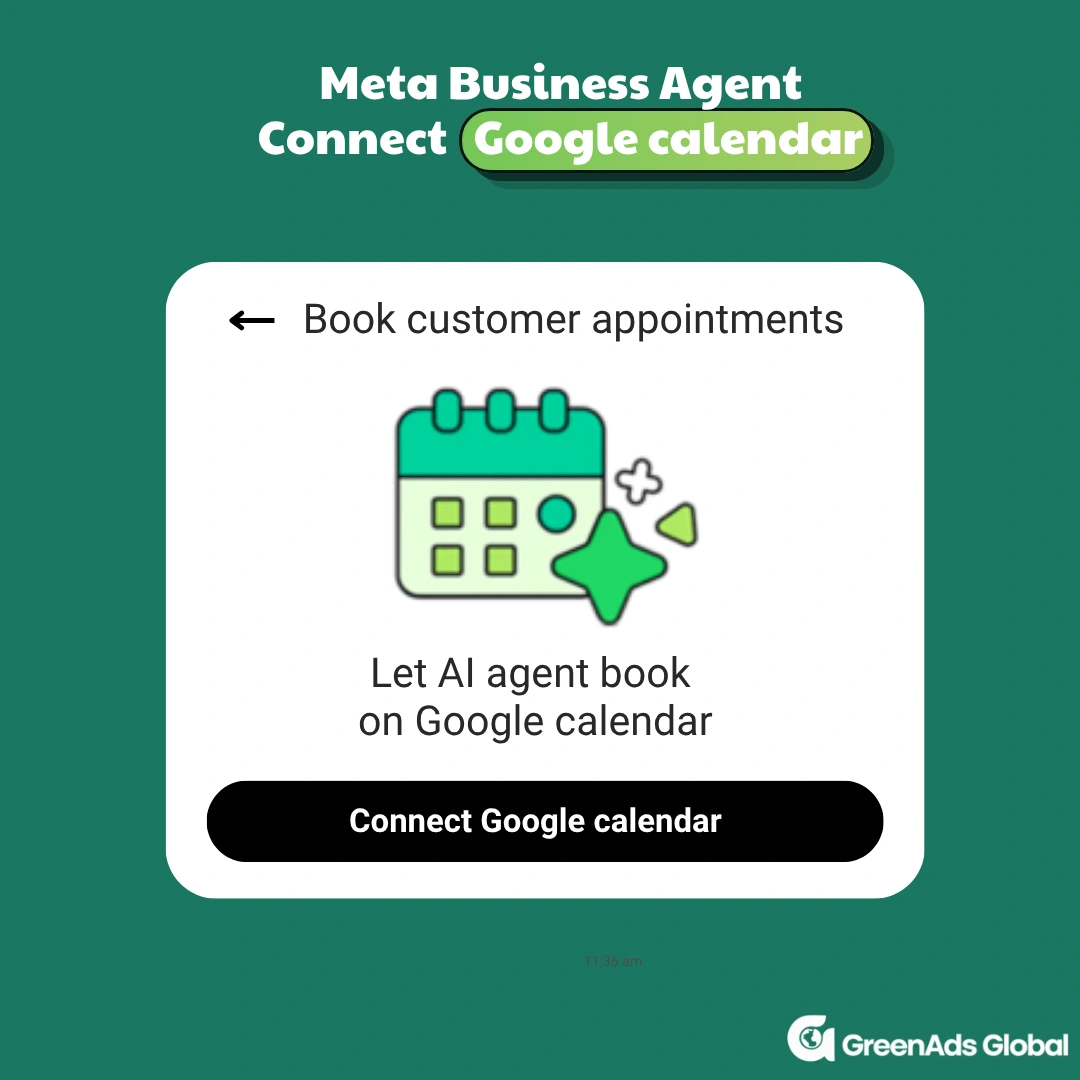
Book appointments through Google Calendar :
Businesses can connect Google Calendar to Meta Business Agent through the WhatsApp Business app. Meta will access Google calendar (such as availability and event details) to enable your Business AI agents to book appointments with customers. Your AI agent will use this info to book appointments for you in chats.
Use Google Drive files as business knowledge:
Businesses can connect selected Google Drive files to Meta Business Agent. Once connected, the agent can use information from those files to improve its responses to customers. This gives businesses another way to provide detailed information that may not fit naturally into a WhatsApp business profile or product catalog.
h) Morning briefings:
Meta Business Agent can provide a morning briefing that summarizes chats you missed overnight and highlights useful insights from customer conversations. Meta is initially rolling this out to a select number of businesses.
i) WhatsApp Business Discovery:
Meta is also making businesses, powered by Meta Business Agent, easier to find on WhatsApp. Customers will be able to search for a business by name or discover it when its phone number or contact card is shared in a chat.
3. Things to know before you set up Meta Business Agent
Before enabling the agent, review how it could affect your account, existing workflows and customer conversations.
Start with account availability :
Your business phone number should already be registered in the WhatsApp Business app. Check Tools for Meta Business Agent.
Some app features may be affected :
Turning on Meta Business Agent may affect your ability to use broadcast lists, disappearing messages and basic automation features like greeting and away messages. You can restore these features by deleting Meta Business Agent.
Existing linked devices will be disconnected :
Enabling Meta Business Agent disconnects existing linked devices. Most can be linked again after onboarding.
Understand privacy before choosing your settings :
When customers first chat with a business that has Meta Business Agent enabled, they are shown a notice explaining that “AI from Meta receives chats to improve AI quality and generate messages for this business.”
It is important to understand that muting the Business Agent and taking over the conversation manually does not necessarily stop Meta’s AI from learning from those chats. Muting primarily pauses the agent’s automated responses; it should not be treated as the same as disabling the AI functionality altogether.
Meta, WhatsApp’s parent company, may use information from conversations where AI features are enabled - including messages exchanged during those chats - to improve its AI systems.
4. How to set up Meta Business Agent in the WhatsApp Business app
The setup does not require coding. You activate the agent through the app and provide the information it should use.
1. Open the setup and confirm your account
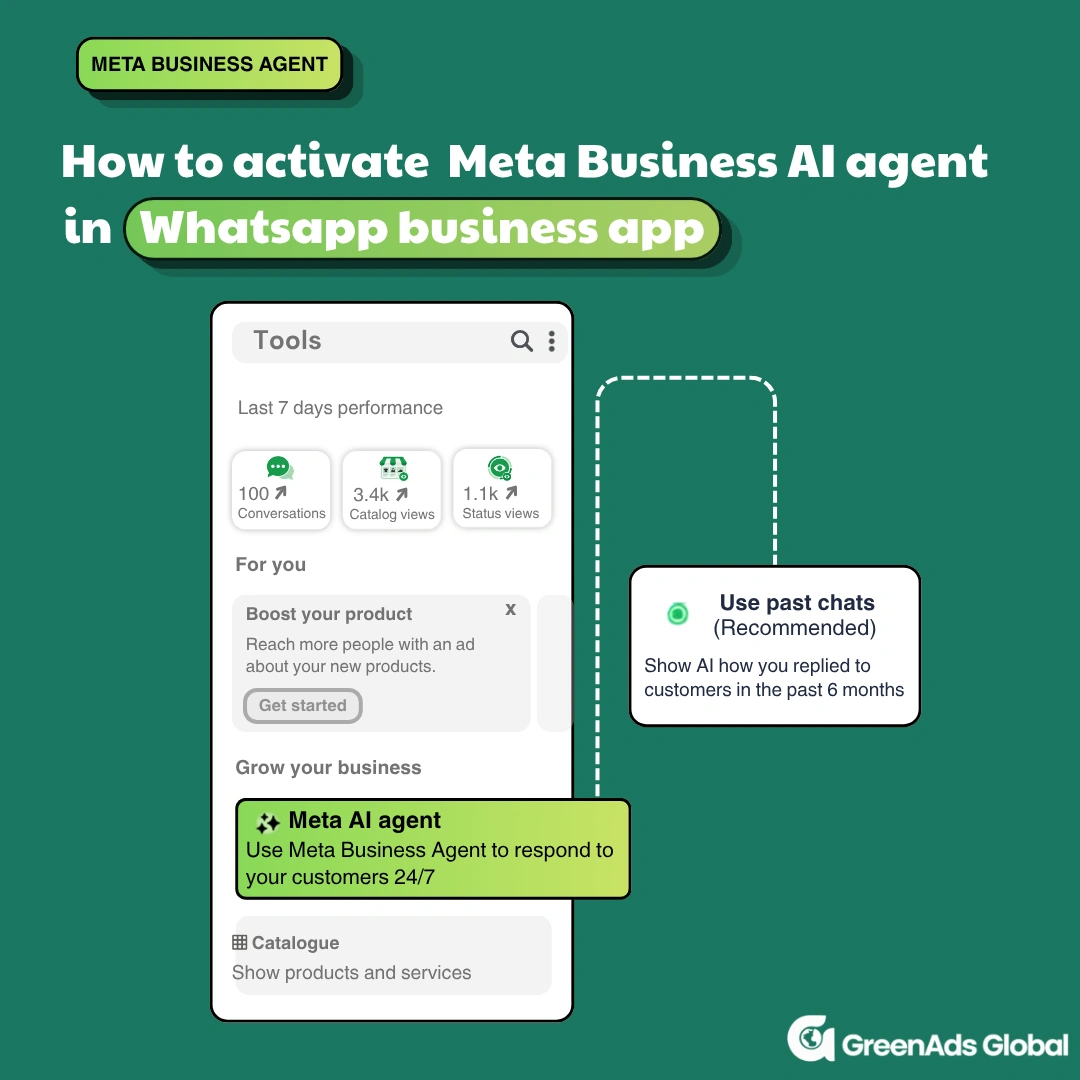
Go to Tools → Meta Business Agent → Create AI agent.
2. Choose whether to use past chats
During onboarding, you can select:
Use past chats: to show the Meta Business Agent how you answer questions from past 6 months
Ignore past chats: Skip using those historical conversations as a teaching source.
Before choosing, consider whether your old answers are still accurate. Previous discounts, delivery promises or discontinued services may no longer reflect how your business operates.
3. Add your catalogue and business information
Add product info, example responses, files and links.
4. Complete setup and check the reply settings
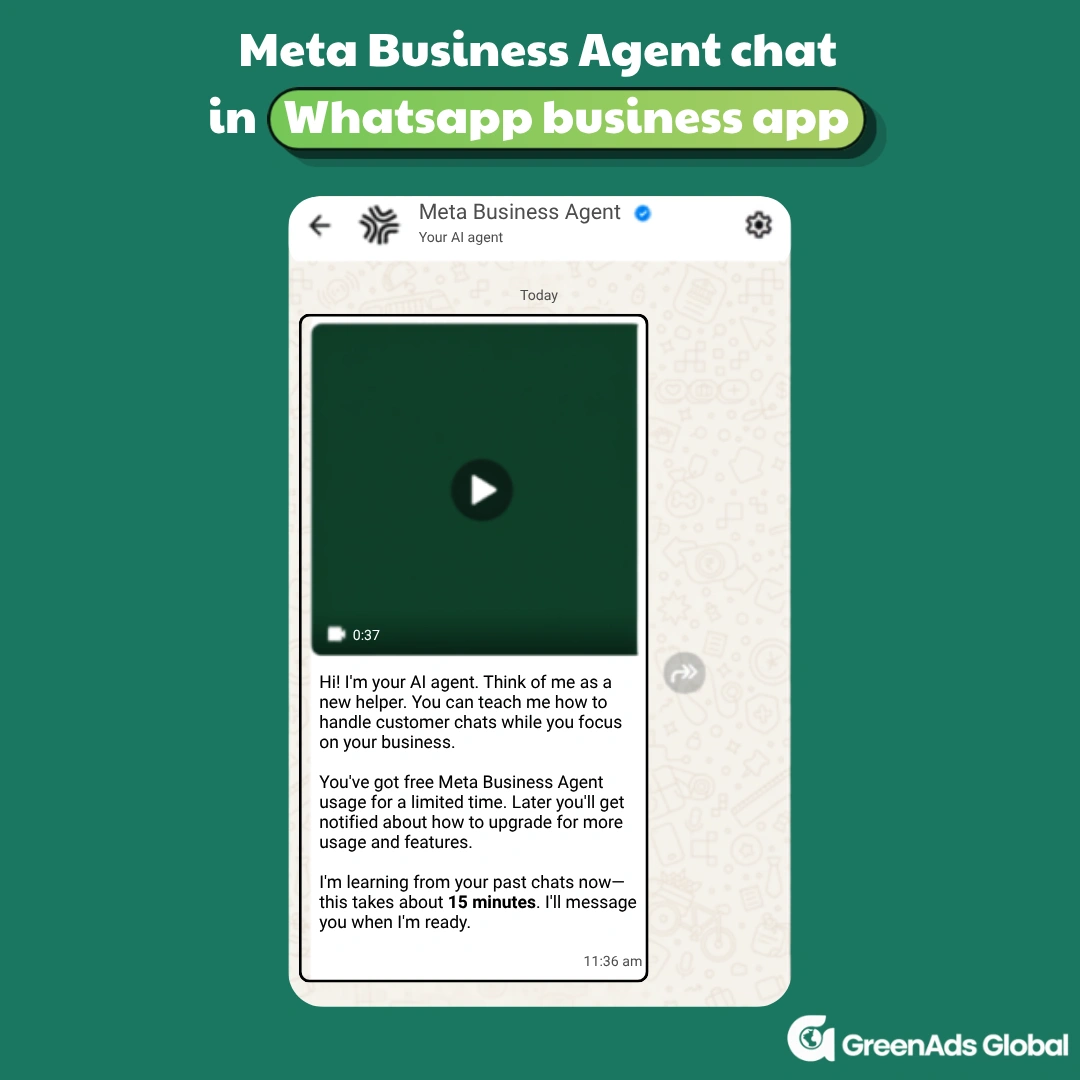
Once your past chats button is switched on – it takes 15min for it learn and can start replying. But when the agent lacks enough information to respond, it may enter learning mode, collecting information from new chats before it begins answering customers again.
Test chat : check the answers before customers depend on them
WhatsApp recommends testing the agent as if you were a customer, reviewing its replies and refining the information it uses over time.
Start by sending test messages to see how it answers product questions, shares business hours or handles common requests. You can return to the Tools menu at any time to adjust replies, change the tone or update business information.
If the agent gives an incorrect answer, note the question, its response, the correction you made and the result when you ask again. This makes it easier to see whether your changes have actually improved the response.
For the initial rollout, start with a small, clearly defined use case—such as handling product questions from new enquiries—and expand only after you have reviewed the results.
5. How to manage Meta Business Agent in WhatsApp chats
Once you’ve set up Meta Business Agent, how d o you check whether it’s active in a chat? And how do you pause its replies if it gives a customer inaccurate information or you’d prefer to handle the conversation yourself ? Here’s how to check whether the agent is present, pause automatic replies, respond manually and turn AI replies back on when you’re ready.
How to check whether Meta Business Agent is present
If Meta Business Agent is present in a chat, it will feature the ✦• icon . It appears whenever Meta Business Agent is actively answering customer questions or simply learning from the responses you send.
What learning mode and paused replies mean
Learning mode applies when the agent needs more information before it can answer customers. It gathers information from new chats to learn how to respond.
Paused replies with continued learning is a setting you choose. It stops the agent from sending automatic responses in new chats while allowing it to continue learning from those conversations.
The distinction is that learning mode reflects the agent’s need for more information, while paused replies reflect your decision to stop automatic responses.
How to respond manually instead of using Meta Business Agent
You can take over a conversation while Meta Business Agent is actively responding :
- Open the chat where you want to reply yourself.
- Tap Respond manually.
When you respond manually, the agent stops generating responses but it doesn’t stop learning.
How to unmute Meta Business Agent when it is in learning mode
To let the agent start responding on your behalf while it is in learning mode :
- Open the relevant chat.
- Tap the ✦• icon.
If Meta Business Agent is in learning mode and detects that a customer has asked a question that it is able to answer, the ✦• icon will expand to read See AI reply. Tap See AI reply to view the response that Meta Business Agent has generated. If you are satisfied with Meta Business Agent's response, tap Turn on AI replies to unmute Meta Business Agent and have it send the message.
Control which chats receieve automated messages from Meta Business Agent :
6. Industry wise-use cases
Here are 3 simple use-cases of how Meta Business Agent could be used in different industries.
E-commerce and retail
Imagine a customer asking a homeware shop, “Which of these items would make a suitable gift ?” A sensible workflow would be to recommend relevant catalog products, explain their features and prices and share purchasing instructions.
In WhatsApp’s case study for Guitarras David Alcántara, the owner reported that Meta Business Agent responded to 60% of 400 enquiries from one campaign. He had focused its training on common guitar-purchase questions.
Appointment-based services
For businesses that rely on appointments, such as salons, consultants or repair services, Meta Business Agent can answer questions about services, prices and booking requirements.
And with the Google Calendar integration feature, the agent can access your calendar information (such as availability and event details) to help book appointments at dates that work for both you and the customer
Travel and hospitality
A guest house or travel business could use the Meta Business agent to answer questions about the information it has supplied: facilities, check-in policies, package details, directions or purchasing steps.
The takeaway is that, regardless of industry, Meta Business Agent can handle a wide range of customer conversations using the knowledge you provide about your business. More importantly, you remain in control of what it knows, how it responds, and when it engages with customers.
7. What is the price of Meta Business Agent in WhatsApp Business App ?
Now, the most anticipated question is: “What is the price of Meta Business Agent?” For now, the feature is available free of charge to all business owners.
For eligible businesses using Meta Business Agent directly in the WhatsApp Business app, Meta is currently offering free usage for a limited time. When businesses first activate the Meta business Agent in the WhatsApp Business app, the agent displays the message: “You’ve got free Meta Business Agent usage for a limited time. Later you’ll get notified about how to upgrade for more usage and features.”
Pricing for the WhatsApp Business app was discussed during Meta’s Q2 2026 meeting, when the company stated: “We plan to begin charging businesses for Meta Business Agent usage through a mix of subscriptions and volume-based token pricing.”
For the WhatsApp Business App, Meta uses a subscription-based pricing model.
Let’s look at the subscription aspect:
For now, Meta describes Meta Business Agent as a freemium offering. Businesses can get started and send a limited number of messages for free, then subscribe to Meta One for higher messaging limits.
Meta Business Agent will be available as part of the Meta One subscription offering.
There are four Meta One subscription plans :
Meta One plan: Businesses get access to 24/7 responses from Meta Business Agent.
Meta One Advanced plan: Businesses get even more access to 24/7 responses from Meta Business Agent.
Meta One Expert plan: Businesses get expanded access to 24/7 responses from Meta Business Agent.
Meta One Max plan: Businesses get maximum access to 24/7 responses from Meta Business Agent.
But here’s the catch - Meta One plans are not currently available in India – this means for now, the Meta Business Agent is free and when the Meta Business agent pricing becomes effective – the Meta One plan will automatically effective in the app.
For now, on WhatsApp's official site, it has been stated "Access to Meta Business Agent is limited. If you reach your free limit on the WhatsApp Business app, you can subscribe to a Meta One plan to get more access to 24/7 responses from Meta Business Agent, or wait for your free limit to refresh."
8. Meta Business Agent vs Meta AI business assistant
With Meta releasing several AI-powered tools for businesses, the names can get confusing. Two that are easy to mix up are Meta Business Agent and Meta AI Business Assistant - but they serve very different purposes.
Meta Business Agent is customer-facing. It represents your business in customer conversations and, in the WhatsApp Business app, it can use your business information to answer questions, recommend products, collect customer details, and bring you into conversations that need your attention.
Meta AI Business Assistant, by contrast, is designed to support the business itself. It acts as a support tool for advertisers, helping with campaign setup, performance analysis, and account troubleshooting. Using current and past campaign data, it can generate insights and charts, compare results with industry benchmarks, suggest ways to optimise campaigns, and help resolve account issues. You can also ask Meta AI Business Assistant questions using the WhatsApp Business app search bar
9. Conclusion :
Meta Business Agent gives WhatsApp business app owners a shift from basic automation that it used to support to actively support customer conversations and sales. Its value lies not only in answering routine questions 24/7, but also in learning business information with the opportunity to stay updated.
For businesses considering it, the key is to treat the agent as an initial extension of the team rather than a set-and-forget chatbot. Start with accurate business information, test its responses, define which conversations it should handle and keep human oversight in place. Once it starts performing accurately, it can take over conversations and handle conversations while you sleep.
As Meta introduces subscription and usage-based pricing, businesses should evaluate the agent based on how effectively it reduces repetitive work while maintaining a smooth path to human support. Businesses that need advanced AI workflows, integrations or multi-agent capabilities can move beyond the Business App and work with a WhatsApp API provider for AI automation to build more customized solutions.
See how CRM events become customer communication
Open each workflow to see the trigger, live-data check, communication action and stopping condition.
New lead qualification
Abandoned cart follow-up
Appointment communication
Payment or renewal reminder
Should the next message still be sent?
Open a customer state to see how current CRM or commerce data should change the workflow.
Lead is already qualified
Customer completed the purchase
Appointment was cancelled
Payment is complete
₹ 899
₹ 2,249
₹ 3,149
$30
$50
Frequently Asked Questions
1. What is Meta Business Agent in WhatsApp Business App ?
Meta Business Agent is an AI agent that represents your business in customer conversations. In the WhatsApp Business App, it can use your business information to answer questions, recommend products, collect customer details and bring you into conversations that need your attention.
This goes far beyond basic automations such as greeting messages, away messages, and quick replies. Instead, businesses get an AI agent that can handle a much wider range of customer conversations in a more natural and intelligent way.
Meta Business Agent can also extend beyond conversation automation through integrations with tools such as WhatsApp Business Discovery, Google Calendar and Google Drive, allowing your business to be discovered by a simple search, support convenient scheduling, and upload business information respectively.
2. What are the features of Meta Business Agent in WhatsApp Business App?
Meta Business Agent can reply to customers 24/7, answer common business questions, recommend products or services, and help move conversations toward a sale. It can also explain pricing, discounts, payments, shipping, returns, and other purchasing details. When a conversation needs human attention, it can send it to the AI handoff list for a team member to take over. Businesses can also connect Google Calendar for appointent booking and Google Drive to give the agent more business knowledge. Meta is also introducing features such as morning briefings and improved business discovery on WhatsApp.
3. Can I set up an AI agent in WhatsApp Business App ?
Yes you can set up an AI agent in WhatsApp Business App. Go to WhatsApp Business App → Tools → Meta Business Agent → Create AI Agent in the WhatsApp Business app. Choose whether you want the AI to learn from your past six months of customer chats or skip them. If you use past chats, make sure older pricing, offers, and policies are still accurate. Add your product catalogue, business information, files, links, and example responses. After setup, the agent may take around 15 minutes to learn before it starts replying. If it does not have enough information, it may enter learning mode until it learns more from new conversations.
Businesses that need more advanced AI workflows, integrations or multi-agent capabilities can instead use a WhatsApp API provider for AI automation, like GreenAds Global, to build a more customized AI agent on the WhatsApp Business API.
4. How to teach Meta Business Agent in WhatsApp Business App?
Go to WhatsApp Business App --> Tools --> Your AI Agent --> Knowledge to teach Meta Business Agent about your business. Add example responses, product information, bestsellers, purchasing details, documents, images, links, prices, policies, business hours, and shipping information. You can also manually reply to customers, and the agent may learn useful business information from those conversations. Review what the AI has learned regularly and edit or delete outdated information when needed. Meta Business Agent may also ask you to provide additional information about your business to improve future replies.
5. How to pause or delete Meta Business Agent in WhatsApp Business App ?
To pause Meta Business Agent, go to Tools → Your AI Agent → AI Replies and select Pause for new chats but learning. This stops AI replies in new chats, but the agent can continue learning; manually replying in an existing chat also pauses the AI for that chat.
To delete Meta Business Agent, go to Tools → Your AI Agent → AI Replies → Disconnect AI → Disconnect and delete my AI, complete the short survey, and tap Submit. If you enable the agent again later, you’ll need to complete the setup process again.
6. How to remove Meta Business Agent from an individual chat in WhatsApp Business App ?
Open the customer chat, tap the contact or group name, then go to Include your AI → Remove AI. This stops Meta Business Agent from replying in that chat and from learning from your manual responses there. To turn it back on later, follow the same path and select Enable AI.
7. How do I know if Meta Business Agent is active in a chat in WhatsApp Business App ?
· Look for the ✦• AI icon in the chat. It appears when Meta Business Agent is either replying to customers or learning from your responses.
· If you want to take over, tap Respond manually; this stops AI replies but may still allow the agent to keep learning.
· Learning Mode means the agent needs more information before replying, while Paused Replies means you have chosen to stop automatic responses.
· To turn AI replies back on, tap the ✦• icon, review See AI reply if available, and select Turn on AI replies.
8. Why do I not have access to Meta Business Agent feature in my WhatsApp Business App ?
WhatsApp’s product page describes availability for eligible businesses in selected markets. A missing option does not, by itself, prove a setup error. Check the options available to your account rather than assuming access from the expansion announcement alone.
If you are unable to access Meta Business Agent, you can add yourself to the waitlist by clicking here.
9. What is the AI Handoff feature in Meta Business Agent in WhatsApp Business App ?
The AI handoff list shows business owners the customer chats that Meta Business Agent believes need human assistance. Go to Chats → AI handoff and open the listed conversation chats to reply manually. You can choose to remove chats from the handoff list either immediately after you reply or 24 hours after your reply. Chats inactive for seven days are removed from the handoff list but remain available in the main Chats tab.
10. What is the price of Meta Business Agent in WhatsApp Business App ?
Meta Business Agent currently follows a freemium model. Businesses get limited free usage, after which they can subscribe to a Meta One plan for higher limits.
Meta One is not yet available in India, so eligible businesses can currently use Meta Business Agent within the free limit.
You may Also like
Book a One-to-One Meeting With Our Product Expert
Have questions? We have got answers! Connect with our product expert for a personalized demo session and discover the best messaging solutions for your business.
.svg)
