Unlock Your 7-Day Free Trial with Free Credits!
Get Started for Free



Unified Inbox for Sales & Support: How to Manage Customer Conversations Better
October 16, 2026
.
10 min read
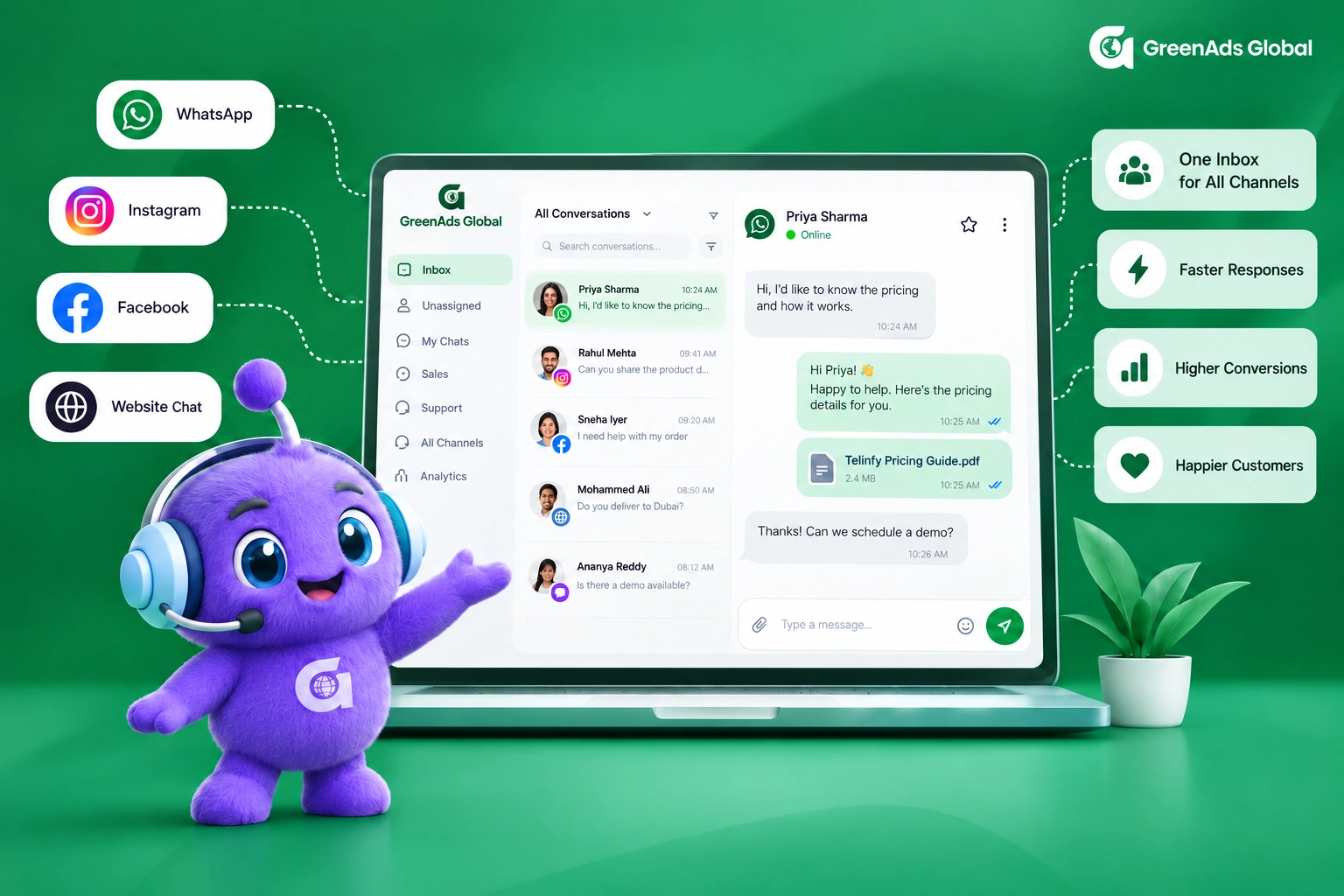
Table of contents

A unified customer messaging inbox works best when it creates ownership, context and a clear next action. Sales teams need progression, support teams need resolution, and both need consistent assignment and handoff rules.

Customer conversations become difficult to manage long before a company feels “large.” A lead may start on WhatsApp, a support question may arrive later, another teammate may respond, and important context can disappear between people, devices and tools.
A unified inbox for sales and support is useful when it creates clear ownership, preserves conversation history and gives teams a practical way to move a customer from first enquiry to resolution without repeatedly asking for the same information.
1. What Problems Does a Unified Customer Messaging Inbox Solve?
The main problem is not the number of channels. It is fragmented ownership.
- Missed enquiries: messages remain unread because nobody knows who owns them.
- Duplicate replies: two people respond to the same customer because activity is not visible to the team.
- Lost context: sales, support and operations each see only part of the conversation.
- Slow handoffs: the customer repeats the issue when a new team member takes over.
- Poor follow-up: promising leads and unresolved support conversations are difficult to prioritize.
The goal is not simply to place messages on one screen. It is to give every conversation an owner, status and next action.
2. How Are Sales and Support Inbox Workflows Different?
Sales conversations need progression
A sales team wants to understand intent, qualify the lead, answer questions, capture the next step and know when a conversation has become an opportunity.
Support conversations need resolution
A support team needs to identify the customer, understand the issue, preserve case context, resolve or escalate it, and confirm that the customer no longer needs assistance.
The same inbox can support both teams only if routing and ownership rules reflect those different goals.
3. How Should Conversation Ownership Work?
A simple ownership model is easier to operate than a complicated routing tree.
- Identify the conversation type. New sales enquiry, existing-customer support, order question, billing issue or another defined category.
- Assign one accountable owner. The customer should not become everyone’s responsibility and nobody’s responsibility at the same time.
- Set a visible status. New, in progress, waiting on customer, waiting internally, resolved or another small set of meaningful states.
- Define escalation conditions. Decide what should happen when the owner cannot resolve the conversation or when another team is required.
- Close with a clear next step. A booked meeting, qualified opportunity, solved issue, follow-up task or confirmed resolution.
4. How Can Sales and Support Hand Off Conversations Without Losing Context?
A good handoff transfers more than the latest message. The receiving teammate should understand what the customer asked, what has already been promised, what data was verified and what action is expected next.
A useful handoff summary: customer goal → relevant history → action already taken → open question → next owner.
For WhatsApp Business Platform use, Meta’s business messaging policy also emphasizes providing clear escalation paths when automation is used. See the official WhatsApp Business messaging policy.
5. How Can a Unified Inbox Improve Lead Management?
When inbound enquiries live in the same workspace, teams can apply consistent qualification and follow-up rather than relying on individual memory.
- Capture the customer’s requirement and contact details.
- Record the source of the enquiry where available.
- Route high-intent leads to the right salesperson.
- Create a CRM task or opportunity when the qualification rule is met.
- Keep the conversation visible until the agreed next action is complete.
If your process also needs CRM-triggered follow-ups, see our guide to CRM-connected customer communication workflows.
6. Where Should Automation Stop and a Human Take Over?
Automation is useful for repetitive tasks such as collecting basic information, answering approved FAQs, routing conversations and confirming standard updates. It should not become a barrier when the customer needs judgment, negotiation, exception handling or empathy.
A practical design asks three questions:
- Can the system answer accurately from approved information?
- Can the customer complete the task without a person?
- Is there a clear handoff path when the answer is no?
For broader messaging automation, review the WhatsApp automation guide and the Telinfy omnichannel messaging platform.
7. How Should a Unified Inbox Handle Multiple Messaging Channels?
A unified workspace should keep channel context visible rather than pretending every channel behaves identically. WhatsApp, RCS and SMS differ in content formats, delivery status, reachability and reply behavior.
When an important outbound notification also needs backup delivery, treat that as a delivery workflow rather than a support handoff. See WhatsApp and RCS to SMS fallback messaging.
8. What Metrics Show Whether the Inbox Is Actually Helping?
Choose metrics that reflect customer and team outcomes.
- First human response time: how quickly a customer reaches a person when one is needed.
- Unassigned conversation backlog: conversations with no accountable owner.
- Resolution time: time from issue or request to completion.
- Duplicate reply rate: conversations that received conflicting or repeated responses.
- Lead-to-qualified-opportunity rate: useful when sales qualification happens in the inbox.
- Handoff rate and outcome: how often conversations move teams and whether they are resolved afterward.
Do not claim that a new inbox caused better business performance unless you compare comparable periods or controlled workflows.
9. What Should You Define Before Rolling Out a Unified Inbox?
- Which channels will appear in the workspace?
- Which teams can view and reply to each conversation type?
- How are conversations assigned?
- Which statuses are required?
- What information must be passed during handoff?
- When should automation escalate to a person?
- What actions should update the CRM?
- Which metrics will the manager review weekly?
10. How Does Telinfy Fit Into a Unified Sales and Support Workflow?
Telinfy by GreenAds Global provides a shared messaging workspace alongside campaigns, routing, fallback, integrations and analytics. For businesses using WhatsApp Business API, RCS and SMS, this can provide a common operating layer for customer communication while the CRM continues to hold lead and customer records.
The exact inbox channels, assignment logic and integration scope should be confirmed for your account before rollout.
Give Every Customer Conversation a Clear Owner and Next Step
If your team is switching between messaging tools or losing context between sales and support, start with one high-volume conversation type and design the ownership model first.
Explore Telinfy’s unified messaging workspace or book a workflow review with GreenAds Global.
See how CRM events become customer communication
Open each workflow to see the trigger, live-data check, communication action and stopping condition.
New lead qualification
Abandoned cart follow-up
Appointment communication
Payment or renewal reminder
Should the next message still be sent?
Open a customer state to see how current CRM or commerce data should change the workflow.
Lead is already qualified
Customer completed the purchase
Appointment was cancelled
Payment is complete
₹ 899
₹ 2,249
₹ 3,149
$30
$50
Frequently Asked Questions
What is a unified inbox for customer messaging?
A unified inbox is a shared workspace where teams can view and manage customer conversations from supported messaging channels. The value comes from shared history, ownership and handoff rules—not only from displaying multiple channels together. Telinfy includes a unified messaging workspace as part of its omnichannel platform.
How does a unified inbox help sales teams?
It can keep inbound enquiries visible, assign an owner, preserve context and make it easier to qualify a lead and define the next action. Where required, the conversation can also be connected to a CRM workflow for opportunity tracking.
How does a unified inbox help customer support?
Support teams can use a shared workspace to reduce missed conversations, keep issue context visible, assign responsibility and hand off to another person without restarting the customer story.
Should a unified inbox replace the CRM?
Usually not. The inbox is the conversation workspace, while the CRM remains the system for customer, lead, opportunity and activity records. Connecting the two can create a stronger workflow. See how CRM and WhatsApp integration works.
Can automation and human agents work in the same inbox?
Yes, provided the workflow defines when automation can answer or route and when a person must take over. WhatsApp Business messaging policy also requires businesses using automation to provide clear escalation paths. Review the official WhatsApp Business messaging policy.
What should a team measure after implementing a unified inbox?
Useful measures include first human response time, unassigned backlog, resolution time, duplicate replies, handoff outcomes and, for sales, the percentage of conversations that become qualified opportunities.
Which messaging channels can be managed through a unified inbox?
A unified inbox can bring together conversations from the messaging channels supported and configured for the business. With Telinfy by GreenAds Global, businesses can coordinate customer communication across supported channels such as WhatsApp Business API, RCS and SMS within the wider omnichannel platform. The exact channel behaviour and reply capabilities should be confirmed for the account and market.
How should customer conversations be assigned to sales or support teams?
Start with simple ownership rules based on the reason for the conversation. New enquiries can go to sales, existing-customer issues to support, and specialist requests to the appropriate team. Each conversation should have one accountable owner, a visible status and a clear escalation path so customers are not passed between teams without context.
Can a unified inbox help prevent duplicate replies?
It can reduce the risk by giving team members shared visibility into the conversation history and by assigning one owner to each active conversation. It does not automatically guarantee that duplicate replies will never happen; permissions, assignment rules, team processes and handoff discipline still matter.
What is the best way to start implementing a unified inbox?
Start with one high-volume conversation type and define the channels, owner, statuses, handoff rules and success metrics before expanding. If customer or opportunity data also needs to update automatically, connect the inbox workflow with the CRM. See the guide to CRM-connected customer communication workflows, or explore Telinfy’s unified messaging workspace.
You may Also like
Book a One-to-One Meeting With Our Product Expert
Have questions? We have got answers! Connect with our product expert for a personalized demo session and discover the best messaging solutions for your business.
.svg)
