Unlock Your 7-Day Free Trial with Free Credits!
Get Started for Free



WhatsApp Business: App vs API - Key Features Compared
September 26, 2026
.
Anya Sam . 8 min read


Both the WhatsApp Business App and WhatsApp Business API help businesses communicate with customers on WhatsApp but the API offers advanced capabilities built for automation, collaboration and scalable customer engagement.
Key differences of WhatsApp Business API from the Business App:
- Automation: Chatbots, workflows and automated messaging.
- Team Collaboration: Multiple agents can manage conversations simultaneously.
- CRM Integrations: Connect with CRM, helpdesk and business applications.
- Scalability: Handle high message volumes and large customer bases.
- Advanced Analytics: Track campaign performance, delivery and customer engagement.
- Pricing: WhatsApp API pricing includes Meta messaging charges and applicable solution provider platform fees, unlike the free WhatsApp Business App.

Every business hits a tipping point where what used to work perfectly suddenly starts to crack under the pressure of growth. In the early days, managing customer chats from a single phone is simple and personal. But as your customer base expands, a solo inbox quickly becomes a bottleneck.
At a 98% open rate - with 80% of messages read within the first five minutes - WhatsApp is undeniably where your customers want to connect. The challenge isn't getting their attention; it’s maintaining a scalable way to respond as you grow.
That is where the distinction between WhatsApp Business App and the WhatsApp Business API matters. WhatsApp Business App is built to help an individual manage customer chats efficiently while WhatsApp Business API is designed to scale customer communication and automate workflows.
What Is the Major Difference Between WhatsApp Business App and API?
The major difference between WhatsApp Business App and WhatsApp Business API is that the app is designed for small businesses that manage conversations manually, while the API is built for larger or growing businesses that need automation, multi-agent access and system integrations. With the API, incoming messages can be routed intelligently to the right team, handled by WhatsApp chatbots or resolved automatically, which makes customer support and sales much more efficient. In simple terms, the app is best for basic one-to-one business communication, while the API is better for scalable, organized customer engagement.
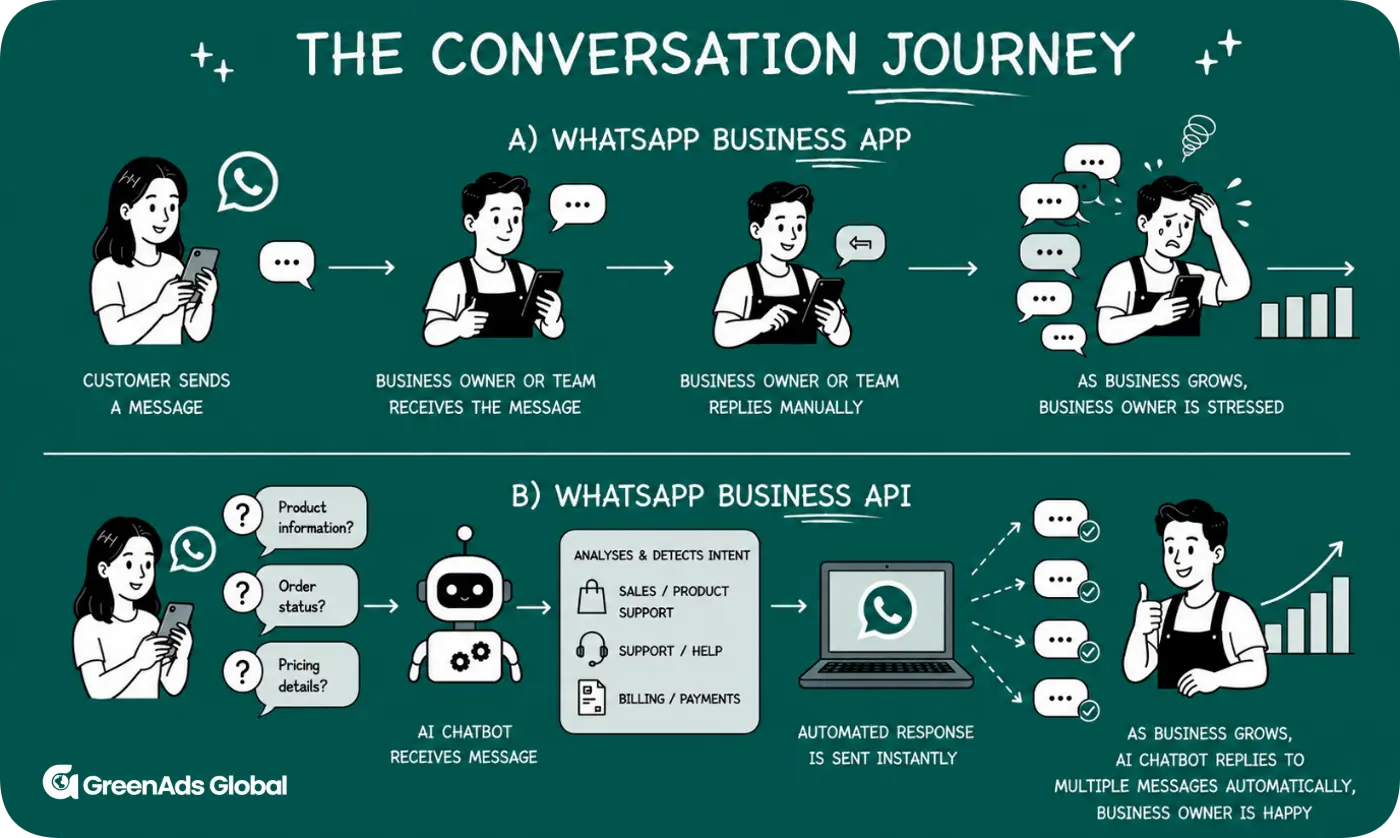
While both WhatsApp Business App and WhatsApp Business API help businesses connect with customers on WhatsApp, they serve different operational needs. Whether a company uses WhatsApp for customer support, sales or marketing, the right solution depends on the volume, complexity and goals of the customer conversations.
In this guide, we’ll explore feature-by-feature comparison between WhatsApp Business App and WhatsApp Business API including WhatsApp API pricing, automation, CRM integrations, broadcast messaging, analytics, scalability and business use cases, to help you discover exactly which solution is the right fit to power your business at its current scale or where it needs to go next.
1. Cost and Scalability
The WhatsApp Business App is a free service suited for small businesses with a limited number of daily customer chats, directly handled from a single device or small team. However, as a firm expands, so does the demand for more scalability and functionality.
The WhatsApp Business API is designed for bulk WhatsApp messaging, enabling businesses to scale customer conversations through seamless system integrations. Unlike the free app, the API incurs charges in two aspects: Meta incurred message pricing and solution provider platform fees. While it takes a financial commitment, the API gives organizations the scalability, automation and collaboration features you would need to use WhatsApp as a structured customer interaction channel rather than just a chat service.
2. Approval and Blue Tick Verification
With the WhatsApp Business App, getting started is straightforward. A business owner can download the app, register a phone number, verify it via SMS or call and immediately begin using features such as catalogues, quick replies and labels. Eligible businesses may also access Meta’s business verification features, which can display a verification badge next to the business name.
The WhatsApp Business API requires a different setup. Businesses typically need to complete Meta Business Manager Verification and activate the API through a WhatsApp Business Solution Provider (BSP). If the Meta Business Manager account is already verified, activation can often be completed within 24–48 hours, depending on the provider. Eligible businesses may also apply for official business verification, which can display a blue verification badge and help build customer trust.
3. Multi-User Access
The WhatsApp Business app enables for 1 primary phone and up to 4 linked companion devices, which is great for small teams with a minimal number of client chats. But all users are in one chat environment, with limited ability to allocate chats or track performance of individual users
The WhatsApp Business API allows shared team inbox accessible to an unlimited number of agents to handle chats. You may automatically allocate customer queries to certain departments, such as sales, support or billing. This creates a more structured and efficient workflow while reducing duplicate responses or preventing missed messages. Shared inbox functionality also improves collaboration across customer support, sales and marketing teams while maintaining complete conversation history.
4. WhatsApp CRM and Business Integrations
The WhatsApp Business App lacks integration capabilities. WhatsApp Business API is designed for deeper API integration with CRM platforms, helpdesk software, e-commerce systems, marketing tools and custom business applications. This allows businesses to connect customer conversations such as customer records or purchase history.
For example, imagine a customer who previously enquired about a laptop but didn't complete the purchase. A week later, they send a WhatsApp message asking, "Is it still available?" If the business has integrated WhatsApp Business API with Shopify, Zoho or HubSpot, the sales representative instantly sees the customer's previous enquiry and the product they were interested in. This allows the representative to continue the conversation with full context instead of asking the customer to repeat their requirements.
Thus, CRM integration creates a complete customer profile, allowing businesses to deliver personalised customer experiences across every WhatsApp interaction.
5. WhatsApp Chatbots, AI and workflow automation
Both WhatsApp Business App and WhatsApp Business API offer automation, but the difference lies in the level of automation they provide.
The WhatsApp Business App includes basic automation tools such as Greeting Messages, Away Messages and Quick Replies. However, the automation is mainly limited to predefined responses and actions performed within the app.
For example, if a customer messages at 8:30 pm asking: “Where is my order?", the Business App can automatically send an away message such as: “Thanks for contacting us. We are currently offline and will get back to you during business hours." The customer still needs to wait for a team member to manually check the order details and respond.
With WhatsApp Business API, businesses can create automated workflows and trigger personalised responses based on customer actions such as FAQs, product recommendations or appointment scheduling. Businesses can also train WhatsApp chatbots using their own business database, documents, product information and FAQs, enabling the chatbot to understand their business context and deliver accurate, relevant and personalized responses. For example, a customer messages at 8:30 pm: "Where is my order?" The WhatsApp Business API can directly connect the customer's request with the order management system, retrieve the latest tracking information and automatically respond: “Your order #12345 has been shipped and is expected to arrive tomorrow." The system can also update the CRM, record the interaction and notify a support agent only if further assistance is required.
6. WhatsApp Broadcast Messaging
WhatsApp Business App lets you send one message to up to 256 contacts per Broadcast list. Yes, it is free, but it comes with the limitation that contacts must have saved the business number to receive messages. If they haven’t saved your number, the message will vanish with no delivery failure warning.
Additionally, managing broadcast lists and sending messages manually can become increasingly time-consuming as your customer base grows. Businesses frequently use WhatsApp broadcasts for abandoned cart recovery, product launches, order updates, appointment reminders and customer retention campaigns.
WhatsApp Business API supports bulk messaging, up to 100,000+ per day, through approved message templates and WhatsApp policies. Businesses can send personalised notifications, promotional campaigns, reminders and transactional messages as part of their WhatsApp marketing strategy. Using the WhatsApp Business API, you can personalise each broadcast with customer names, purchase history, reminders making every message feel one-to-one. All broadcasts are secure, opt-in based and comply with WhatsApp’s business messaging policies—ensuring trust and reliability.
7. Message types
The WhatsApp Business App supports standard text messages, rich media (photos, videos, documents, audio, contacts and locations) and catalogue/product sharing for one-to-one customer conversations. It also includes basic automation features such as Greeting Messages, Away Messages and Quick Replies, along with broadcast messages to up to 256 contacts per list, provided recipients have saved your business number.
The WhatsApp Business API supports all standard messaging formats while adding advanced business messaging capabilities. Businesses can send Meta-approved template messages (including marketing, utility and authentication messages), interactive messages with buttons and lists and high-volume personalised broadcasts. Since WhatsApp API pricing can vary depending on the type of business messaging being used, businesses should consider the applicable messaging category when planning campaigns. Combined with automation and CRM integrations, these message types enable scalable customer communication, notifications and marketing campaigns.
8. Analytics and Reporting
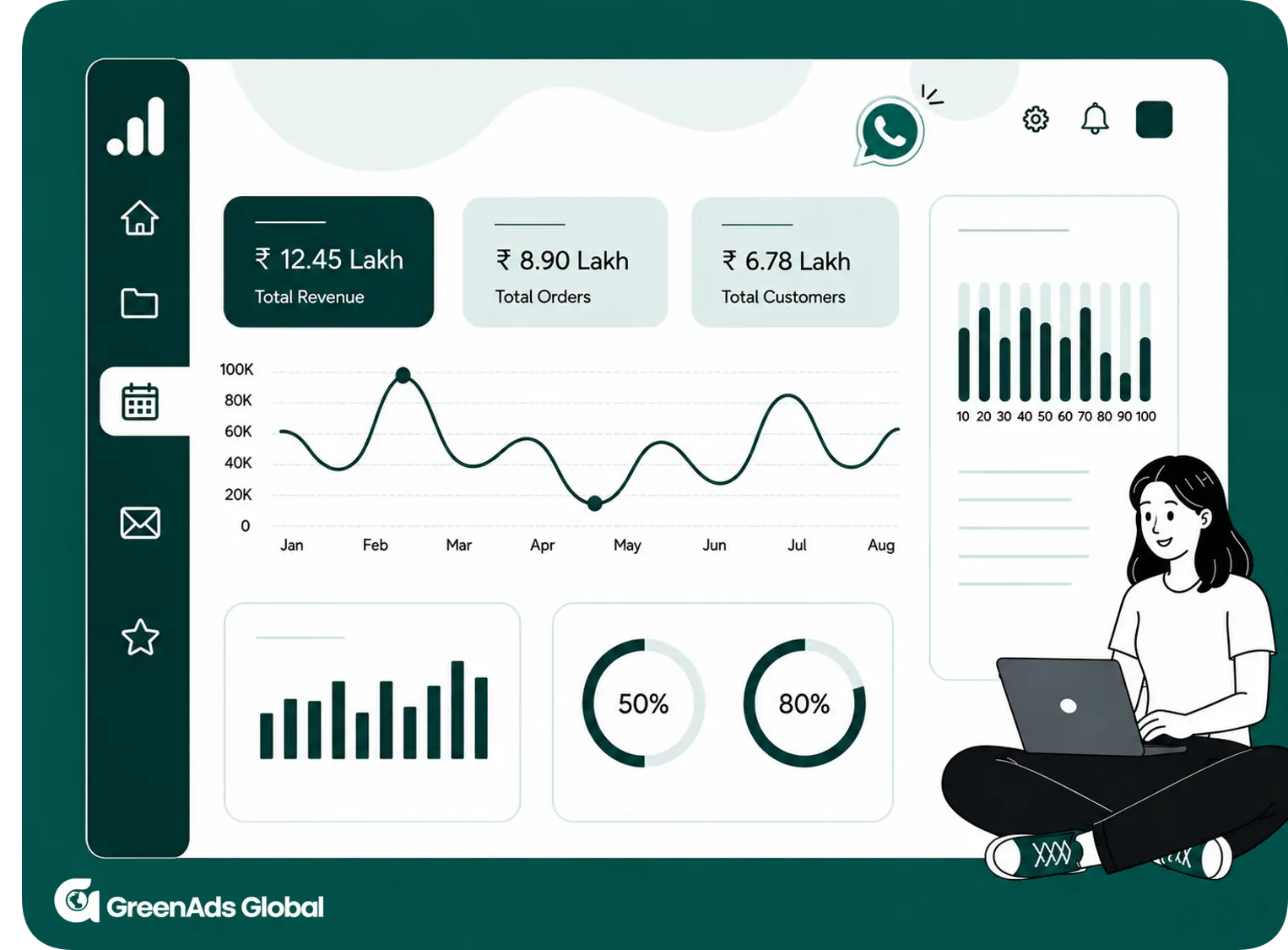
The WhatsApp Business App provides only basic conversation insights- whether a message has been sent, delivered, read, or replied to, but that's where the visibility largely ends.
With WhatsApp Business API, analytics become a powerful operational tool that goes beyond basic message tracking. You can track delivery, read and failure rates, compare the performance of past campaigns and measure return on investment (ROI) over time.
If you're using Telinfy's multi-channel messaging platform, you can compare the performance of WhatsApp, SMS and RCS campaigns from a single dashboard and identify which channel delivers the best engagement results.
WhatsApp Business API analytics help businesses optimize campaigns, improve customer engagement and make data-driven marketing decisions.
Difference between WhatsApp Business App and WhatsApp Business API :
Conclusion:
Ultimately, the choice between WhatsApp Business App and WhatsApp Business API depends on how a business wants to manage customer conversations. The app supports direct communication, while the API enables advanced business messaging, automation and scalable customer engagement.
For any size or type of company, it’s simply good business to reach customers where they already are. WhatsApp Business API make it easy to create personal experiences that engage and retain customers - all on a channel where customers already feel at home.
Businesses looking for a scalable WhatsApp business solution with CRM integration, AI chatbot automation, broadcast messaging and enterprise messaging capabilities will benefit from the WhatsApp Business API.
Whether you're running an ecommerce store, healthcare practice, educational institution or service business, the WhatsApp Business API provides the flexibility to automate customer engagement, improve response times and deliver personalised customer experiences at scale.
₹ 899
₹ 2,249
₹ 3,149
$30
$50
Frequently Asked Questions
1. What is the difference between WhatsApp Business app and WhatsApp Business API?
The WhatsApp Business App is a free, manual mobile tool for micro-businesses with single or small-team access. The WhatsApp Business API is a paid, scalable infrastructure connecting WhatsApp to CRMs and AI chatbots for large teams, supporting unlimited messaging, the official blue verified tick and advanced automation.
2. Which WhatsApp is better, WhatsApp Business app or WhatsApp Business API?
Neither is objectively "better" overall, but the API is better for large-scale businesses. The choice depends strictly on your scale, team size and feature needs.
Stick with the WhatsApp Business App if you are a solo entrepreneur or a very small team, you manually manage customer chats and you don't require automated campaigns or CRM integrations.
Upgrade to the WhatsApp Business API if your business is growing and you need WhatsApp workflow automation, a multi-agent inbox and customer support automation.
3. How does WhatsApp API pricing differ from the WhatsApp Business App ?
The WhatsApp Business App is free for basic business messaging, while the WhatsApp Business API is a paid solution designed for scalable communication. WhatsApp API pricing can include Meta messaging charges and solution provider platform fees, while providing additional features such as automation, multi-agent access, CRM integrations, bulk messaging and advanced analytics.
4. Can I use WhatsApp API and WhatsApp Business on the same number?
Yes, you can use the WhatsApp API and the WhatsApp Business App on the same number simultaneously thanks to Meta's official WhatsApp Coexistence feature. You don't need to delete your account or migrate your number. You can continue handling daily chats on the mobile app while leveraging the API for automation, chatbots and multi-agent CRM platforms.
5. Will my message history be preserved when I switch from the App to API?
Access WhatsApp settings, choose “Chats,” and then “Chat Backup” Ensuring all vital conversations and files are preserved is critical to avoid losing data during the merge. Next, delete the account that you wish to merge into the other.
Pre-existing chat history does not carry over automatically. Your old conversations will not appear in the new system unless you export them first. With coexistence, new messages sync across both platforms going forward.
6. What is WhatsApp Business API and how to use it?
The WhatsApp Business API is Meta's enterprise messaging solution that helps businesses automate conversations, send messages and manage customer communication at scale. It supports chatbots, CRM integrations, multi-agent access and bulk messaging.
To use it, sign up with an official WhatsApp API Solution Provider, complete Meta Business verification and connect the API to your preferred business tools. Once activated, you can manage and automate customer conversations from a single platform.
7. What is a WhatsApp Business Solution Provider?
A WhatsApp Business Solution Provider (BSP) is a Meta-approved third-party company authorized to grant businesses access to the WhatsApp Business API, handling technical infrastructure while providing user-friendly platforms for customer support, marketing and automation.
For example, GreenAds Global is a complete WhatsApp Business API provider with a shared inbox for multiple agents, chatbot automation, bulk and broadcast messaging, CRM integrations, campaign management, analytics and reporting, message template support and much more. This enables businesses to launch quickly, automate customer engagement and scale conversations from a single platform.
8. Is WhatsApp Business API free or paid?
The WhatsApp Business API is not free. WhatsApp API pricing includes Meta messaging charges based on the applicable message type and may also include platform fees from the WhatsApp API provider you choose. Businesses should consider both messaging charges and provider costs when comparing the WhatsApp Business API with the free WhatsApp Business App.
9. Does WhatsApp Business API support chatbots?
Yes, the WhatsApp Business API fully supports chatbots. To add a chatbot, you need to connect the API (via an official API Solution Provider like GreenAds) to a conversational AI platform. This setup allows the bot to automate FAQs, capture and qualify leads, recommend products, book appointments, send order updates, collect customer information and seamlessly sync data with CRM systems such as Shopify or Zoho.
10. Can WhatsApp Business API integrate with Shopify or Zoho CRM?
You may Also like
Book a One-to-One Meeting With Our Product Expert
Have questions? We have got answers! Connect with our product expert for a personalized demo session and discover the best messaging solutions for your business.
.svg)
