Unlock Your 14-Day Free Trial with Free Credits!
Get Started for Free


What is WhatsApp Business API ?
September 24, 2026
.
Anya Sam . 10 min read

Table of contents

WhatsApp Business API empowers businesses to automate customer communication, integrate with CRMs and scale messaging for sales, support and marketing—all on the platform customers already trust. With WhatsApp Business API, you can:
- Automate WhatsApp customer support to send 100,000+ bulk messages per day.
- Integrate WhatsApp with CRM, Shopify and Zoho for contextual conversations.
- Scale messaging with multi-agent support and broadcast campaigns.
- Increase customer engagement through personalised messaging and automat

1) What is WhatsApp Business API ?
If your business is growing, chances are you’re experiencing the challenge of addressing the growing customer conversations. One customer wants an order update, another needs clarification on the offers and many more waiting for a response. Handling everything manually becomes a burden.
This is where WhatsApp Business API comes in.
WhatsApp Business API is an official communication solution from Meta that enables businesses to interact with customers on WhatsApp at scale. Unlike the WhatsApp Business App, it is designed for medium and large businesses that need to manage high volumes of customer conversations, automate responses via chatbots, send notifications and marketing messages. This helps businesses provide faster, more personalized and efficient customer support while maintaining secure and compliant communication. It’s designed for scalable, multi-agent communication, typically offered through Meta’s Cloud API or approved Business Solution Providers.
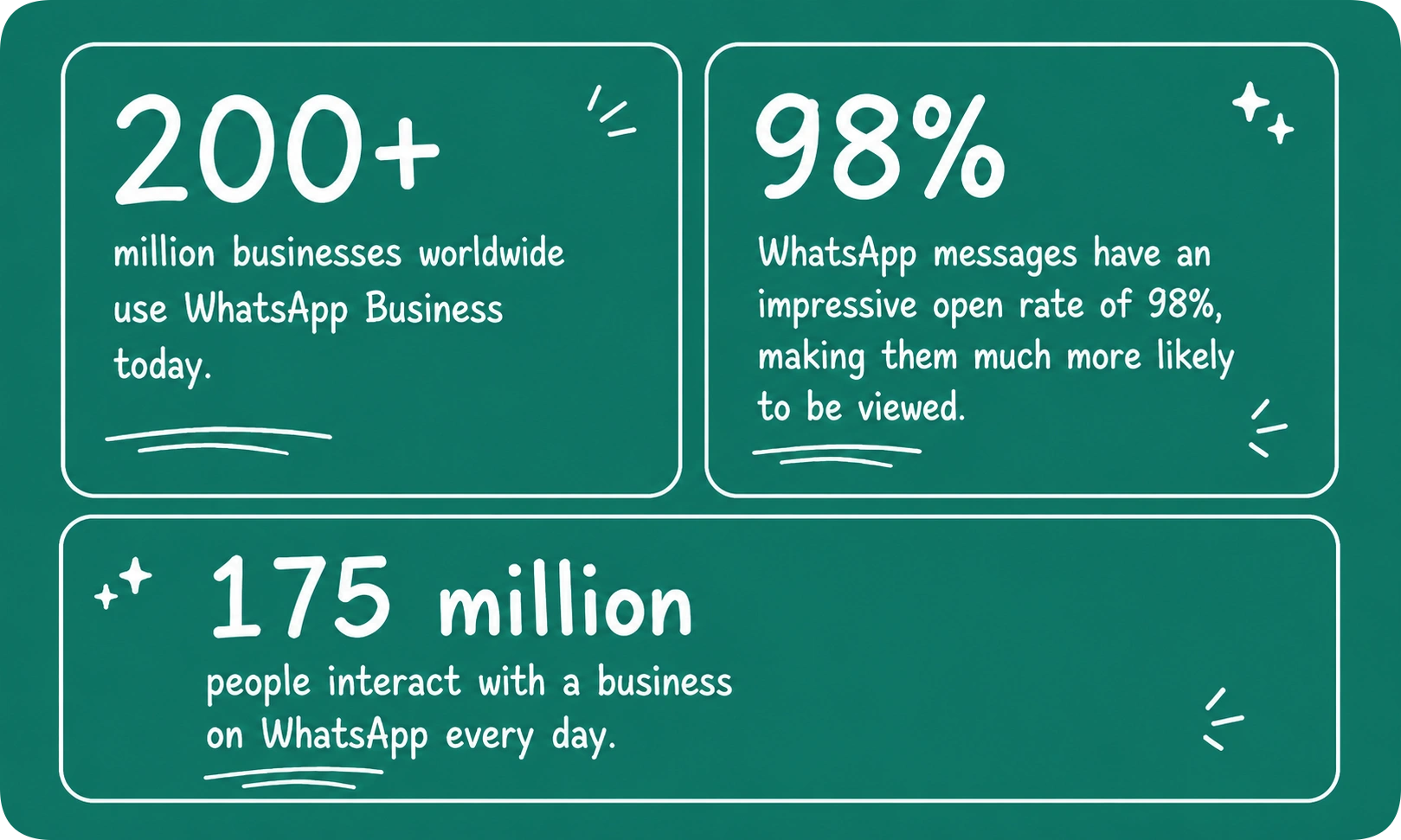
2) WhatsApp Business API vs. WhatsApp Business App: Key Differences
WhatsApp Business App is a free, standalone app designed for small businesses managing a low volume of customer chats on a few devices while WhatsApp Business API is a scalable, secure platform for larger business that need to automate conversations and handle thousands of chats simultaneously. In short choose WhatsApp Business app is you are a solo entrepreneur or a small team looking for a quick cost-effective way to engage with customers. Choose WhatsApp Business API if you are a larger business and need to send mass notifications or send order confirmations and much more !
Related resource : WhatsApp Business: App vs API - Key Features Compared
3) Why your business needs WhatsApp Business API ?
Let’s take a look at why WhatsApp Business API matters for your business:
- Meet customers where they are: Engage customers on a platform they already use, connecting billions of users worldwide.
- Scalability: Reach a larger customer base instantly with high message visibility and engagement rates.
- Automation and Efficiency: Reduce manual effort, save time and improve productivity through automation and AI chatbots.
- Professional business presence: Build trust and stay competitive by adopting a communication channel increasingly used by businesses globally.
- Integrations: Plug WhatsApp API into your CRM like Shopify, Zoho or other third-party apps to keep customer data synced and workflows running without manual switching.
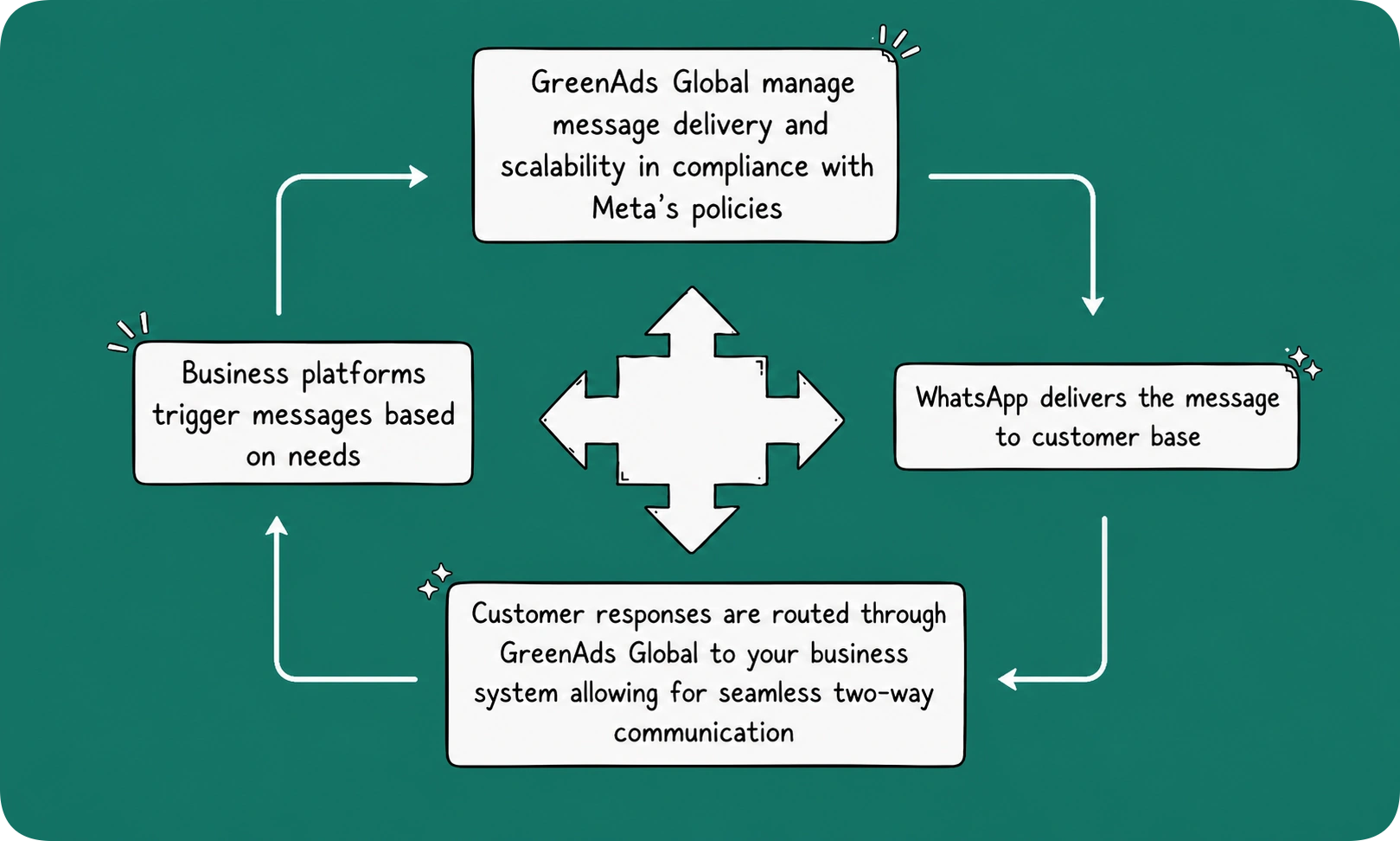
4) How does WhatsApp Business API work ?
5) Getting Started with GreenAds Global : Requirements
To successfully set up and operate WhatsApp Business API, businesses need to meet Meta’s technical and operational requirements such as :
- Meta Business Portfolio (Meta Business Manager account): A Meta Business Portfolio is your business's central account on Meta. It is used to create and manage your WhatsApp Business Account (WABA), phone numbers, users and permissions.
- WhatsApp Business Account (WABA): A WABA is the account within your Meta Business Portfolio that owns your WhatsApp Business phone number(s) and enables them to be used with the WhatsApp Business API.
- Proof of Legal Business Status: Meta requires official documents, to verify that your business is legally registered (any one document from each category) :
Business Name Verification: Certificate of Incorporation, GST Registration Certificate, Udyam/MSME Certificate, PAN Card, Shop & Establishment Certificate, or Business License (for international businesses).
Business Address & Phone Verification: Utility bill (electricity, water, gas, or broadband) or a bank statement with the business address and phone number.
- Dedicated Business Phone Number and mail ID: It can be a new number or an eligible existing number migrated to the WhatsApp Business API. The number and email ID will be the point of contact for all customer communication.
- Business Website: An active website with updated Privacy Policy and Terms & Conditions, mandatory to support business verification and compliance with Meta's requirements.
Once these you have these requirements, there are 2 ways that you can access the WhatsApp Business API :
a) Meta’s WhatsApp Cloud API
The WhatsApp Business Cloud API is hosted and maintained by Meta, so businesses don't need to manage servers, software updates or security.
To get started, you need to create a Meta Business Portfolio, register your application (eg: your business website), connect your WhatsApp Business Account (WABA) and business phone number.
This gives you your API credentials that allow your website to communicate with WhatsApp.
While Meta manages the infrastructure, businesses are still responsible for integrating the API, configuring real-time messaging updates and building features such as chatbots or shared inboxes—making the setup complex for businesses without a development team.
b) WhatsApp API through a Business Solution Provider (BSP)
A WhatsApp API solution provider, such as GreenAds Global, still uses Meta's Cloud API, but handles most of the setup and provides additional business tools.
Typical onboarding looks like this:
- Sign Up with a BSP: Create an account with an official WhatsApp Business Solution Provider (BSP), such as GreenAds Global.
- Connect Your Meta Business Portfolio/ Business manager account, WABA and Phone Number: Connect your Meta Business Portfolio (Business Manager account), then link your WhatsApp Business Account (WABA) and register your business phone number with the WhatsApp Business API.
- Complete Business Verification: If your business hasn't been verified by Meta, we can guide you through the verification process.
- API Configuration: GreenAds configures the WhatsApp Cloud API, API credentials and webhooks required for messaging.
- Start Using Business Tools: Once setup is complete, you can use GreenAds Telinfy platform to manage conversations, send campaigns, build chatbots, integrate with your CRM, view analytics and collaborate through a shared team inbox.
With GreenAds Global, the technical setup and ongoing maintenance are handled by us, allowing you to focus on communicating with customers faster and growing your business.
6) Operational Concepts of the WhatsApp Business API
After setup, the WhatsApp Business API operates according to Meta's messaging policies, pricing model and quality standards. Understanding these concepts is essential for using the API effectively and scaling customer communication.
- Messaging Categories and Templates: There are two message categories- Marketing and Utility. Creating message templates for each and obtaining Meta approval before sending them is mandatory.
- Pricing for messages: Your WhatsApp API cost includes Meta’s charges per delivered template message, with rates varying by recipient country and message category. Since WhatsApp API access alone doesn't include a dashboard or user interface, official providers like GreenAds add platform fees to provide the tools, support and infrastructure needed to actually use the API.
Related resource : WhatsApp API Pricing: Meta Charges & Updates
- Customer opt-in: Customers must opt-in to receive WhatsApp messages. Among others, opt-ins can be collected through websites, checkout pages, SMS or email.
- Quality rating: Your quality rating is based on the recent messages that your customers have received over the past seven days. This rating is determined by feedback from your customers.
- Messaging limits: Meta analyses your message quality to the customer base. Based on this analysis, your business portfolio’s eligibility for automatic scaling will either be approved or denied.
- Security and Compliance: Ensure customer data is protected and follow privacy rules, including GDPR (General Data Protection Regulation) and Meta’s Business and Commerce Policies.
- Developer or BSP based API Integration: Choosing between a direct Cloud API integration or official providers depends on your business's technical bandwidth. It is much easier to integrate WhatsApp with business applications, automate messaging and manage a large customer base with an official provider like GreenAds Global.
7) Key features and capabilities of the WhatsApp Business API
WhatsApp Business API provides businesses with powerful tools to communicate with customers at scale. It includes features such as:
Supports rich media:
Businesses can share rich media such as images, videos or audio files, location pins, and product catalogues, directly within WhatsApp thanks to the WhatsApp Business API. This eliminates the need for customers to visit external website, thus effectively engaging customers on a platform that customers use everyday.
Bulk messaging at scale:
Unlike the free WhatsApp Business app, the WhatsApp Business API is built for volume. It allows you to send thousands of messages instantly to your target audience
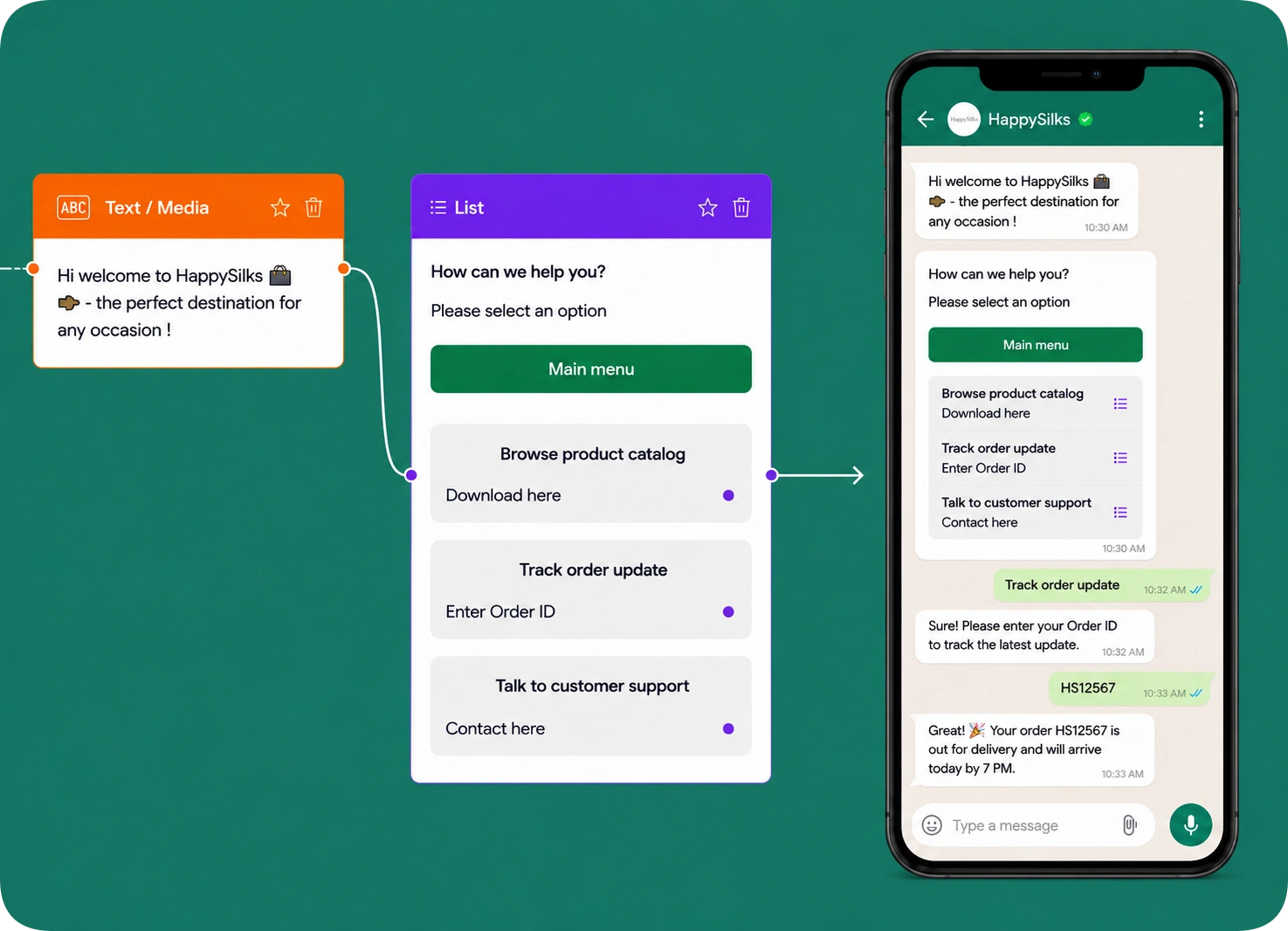
No-Code AI Chatbot:
Build and deploy automated WhatsApp chatbots using a visual drag-and-drop builder of predefined customer conversations —no coding required. Automated customer service via WhatsApp bots is expected to save greater than 2.6 billion hours globally by 2025, reducing agent workload and improving customer service.
AI Chatbot or BYOA (Bring Your Own AI):
Use the GreenAds Telinfy AI chatbot or connect your own AI chabot to automate intelligent, context-aware customer conversations.
Customer relationship management (CRM) integrations:
You can connect WhatsApp directly to your existing business tools, like customer database or email systems, so that all data is in sync. This enables businesses to connect customer conversations with orders, payments and customer records delivering a much faster and personalized customer service.
Analytics and reporting:
While WhatsApp Business API can be used to send any type engaging content, it can also be used to track message delivery rates, read rates and customer engagement. This can help you optimize the communication strategies.
Shared team inbox:
Unlike the WhatsApp Business App, which limits access to a single device, the API allows multiple agents to manage customer conversations simultaneously from one shared WhatsApp number. This eliminates delays and missed conversations, ensuring every customer query is handled promptly.
Role-Based Access Control:
Assign user roles and permissions to control who can access, manage and respond to customer conversations.
8) What are the benefits of WhatsApp Business API for businesses ?
- Enhanced customer experience: WhatsApp Business API enables faster, personalized customer interactions, helping businesses deliver seamless customer support. According to the Meta-Bain Win with Conversations report, 60% of WhatsApp users in India communicate with a business on a weekly basis, underscoring the increasing preference for conversational engagement.
- Reduced Support Costs: With the WhatsApp API automation, routine customer queries, including order monitoring or appointment scheduling can receive instant responses. This can reduce the manual workload and allow customer support teams to concentrate on more complex issues.
- SMS Fallback: If a WhatsApp message cannot be delivered, businesses can configure their communication platform to automatically send the notification via SMS or RCS. This helps ensure critical updates such as OTPs, appointment reminders, payment alerts and delivery notifications reach customers.
Note: SMS fallback is not a native WhatsApp Business API feature; it is enabled through the communication platform integrated with the API.
- Higher conversions: Personalized conversations and timely assistance help businesses convert more leads into customers, boosting lead generation. For example, through click-to-WhatsApp ads and automated conversations, NIVEA, a global skincare brand generated 25K potential customers, demonstrating the impact of WhatsApp-based customer engagement.
9) Industries that can benefit from WhatsApp Business API
1. E-commerce:
A business can use WhatsApp Business API for:
- Order confirmation
- Track delivery
- Customer support
- Reminders to buy the last item left in cart
2. Healthcare
Hospitals and clinics can use it to:
- Confirm appointments
- Send reminders
- Share result reports
3. Travel services
Travel companies can:
- Book confirmations
- Send check-in reminders
- Provide customer assistance
4. Banking services
Banks and other financial services can use it to send:
- Transaction alerts
- Account notifications
- Verification OTP
10) Do You Need the WhatsApp Business API?
1. What Size Is Your Business?
If your business is growing, the WhatsApp Business API provides the scalability, team collaboration and automation features needed to manage conversations efficiently.
2. Are You Managing a High Volume of Customer Conversations?
If you regularly communicate with hundreds or thousands of customers, the WhatsApp Business API helps automate messaging, support multiple agents and handle conversations at scale.
3. Do You Want to Automate or Integrate WhatsApp with Other Business Systems?
If you want to connect WhatsApp with your CRM, website, e-commerce platform or automate tasks such as order updates or appointment reminders, the WhatsApp Business API is the right solution for you.
11) Conclusion: Turn Conversations into Business Growth
WhatsApp Business API has transformed the way businesses connect with customers. It can reach customers almost anywhere, connect through conversations and create memorable experiences.
With GreenAds Global, your business team can focus on customer engagement and development and we take care of all the technical and operational aspects. Start a free GreenAds Global WhatsApp API trial and experience seamless, scalable customer communication first-hand. Our experts are here to guide you every step of the way.
[[cta]]
₹ 899
₹ 2,249
₹ 3,149
$30
$50
Frequently Asked Questions
1. What is WhatsApp Business API and how is it different from WhatsApp Business App?
WhatsApp Business API is a messaging service for medium and big businesses managing high customer volumes. Unlike the free WhatsApp Business App, the API enables multiple business agents, automation, chatbot integration, CRM connectivity and shared team inboxes. It is ideal for businesses looking to scale customer communication while maintaining efficiency and consistency.
2. Who should use WhatsApp Business API?
WhatsApp API is ideal for businesses that:
- Handle high customer interaction volumes
- Need faster responses without increasing headcount
- Have multiple teams communicating with customers
- Rely on timely notifications for revenue or operations
3. How to switch from WhatsApp Business App to WhatsApp API for Business?
Sign up with GreenAds Global to handle the technical backend. On your behalf, WhatsApp Business App number will be deleted and switched over to the API.
4. How much does it cost to use the WhatsApp Business Platform?
Charges vary based on your business requirements and scale, with additional platform fees depending on the Business Solution Provider (BSP) and the services offered.
5. How long does it take to verify and set up WhatsApp Business API?
If your Facebook Business Manager account is already verified, the WhatsApp Business API approval and setup can typically be completed within 24-48 hours.
6. What are message templates in WhatsApp Business API?
Message templates in the WhatsApp Business API are pre-approved, standardized message formats businesses must use to initiate conversations with customers. They are reviewed by Meta to prevent spam. Message templates are classified into three main categories (Utility, Marketing and Authentication), which also determine conversation pricing.
7. What are the common reasons for template rejection?
Templates are most commonly rejected due to spammy promotional language, improper variable formatting or policy violations. Follow WhatsApp's guidelines to ensure compliance.
8. Can I send bulk or marketing messages through WhatsApp Business API?
Yes, you can send bulk and marketing messages through the WhatsApp Business API. However, Meta requires these messages to use pre-approved Message Templates and requires customers to have opted-in to receive communications from your business. Sending relevant, high-quality messages helps maintain good account quality and improves customer engagement.
9. How do I integrate WhatsApp Business API with my CRM or website?
Connect easily through ready-to-use platforms such as GreenAds Global, which provide a direct link to your existing systems.
10. How do I get started with WhatsApp Business API?
Partner with a Meta-approved solution provider like GreenAds Global who will handle account setup, verification and hosting for you.
Book a One-to-One Meeting With Our Product Expert
Have questions? We have got answers! Connect with our product expert for a personalized demo session and discover the best messaging solutions for your business.
.svg)
