Unlock Your 14-Day Free Trial with Free Credits!
Get Started for Free



WhatsApp MCP Server: AI Automation for WhatsApp Business API
September 29, 2026
.
Anya Sam . 5 min read
Table of contents

WhatsApp MCP Server connects AI assistants like ChatGPT, Claude or virtually any AI assisstant with the WhatsApp Business API, enabling businesses to manage campaigns, contacts, broadcasts, reports and messaging workflows through simple natural-language prompts.
Key benefits of WhatsApp MCP Server:
- AI-Powered Automation: Turn simple prompts into WhatsApp Business API actions, reducing repetitive dashboard tasks and manual campaign management.
- Campaign Management: Create and schedule campaigns schedule.
- Reports and Analytics: Retrieve delivery reports, campaign data and analytics instead of manually navigating dashboards.
- No-Code Integration: Connect ChatGPT, Claude and other AI assistants without custom API coding.
- Secure AI Workflows: Human approval by default, combined with WhatsApp Business API encryption, customer opt-ins and Meta messaging policies.

Every day, businesses receive thousands of customer messages on WhatsApp.
While the WhatsApp Business API makes large-scale messaging possible, customers now expect quick, personalized replies.
That's where a WhatsApp MCP (Model Context Protocol) Server comes in.
A WhatsApp MCP (Model Context Protocol) Server connects AI assistants like ChatGPT or Claude to the WhatsApp Business API, enabling them to directly automate business tasks through simple prompts given by you. This way, AI assistants can directly create campaigns, send bulk approved WhatsApp messages, manage contact lists, schedule broadcasts and retrieve delivery reports automatically.
In this guide, you'll learn what a WhatsApp MCP Server is, how it works with the WhatsApp Business API and why it's becoming an essential part of modern business communication.
1. What is the difference between WhatsApp API and WhatsApp MCP Server?
To understand how a WhatsApp MCP Server works, it's important to first understand the role of the WhatsApp Business API and how the two technologies complement each other.
The difference between WhatsApp API and WhatsApp MCP server should be clear.
- API (Application Programming Interface): A technology that allows different software applications to communicate and share information with each other.
- WhatsApp Business API: Meta's implementation of an API for WhatsApp. It allows your business software (such as your website, CRM or chatbot) to send and receive WhatsApp messages, automate conversations and integrate with other business systems.
Here’s the problem WhatsApp Business API solves: It enables businesses to integrate WhatsApp with CRMs, scale messaging for sales, support, marketing (instead of manually using the WhatsApp Business app) and much more!
Related resource: WhatsApp Business: App vs API - Key Features Compared
- MCP (Model Context Protocol): An open standard that enables AI assistants like ChatGPT or Claude to securely connect with external applications.
- WhatsApp MCP Server: The bridge between AI assistants and WhatsApp Business API. This means you give simple prompts to AI assistant (for example, to send campaigns) and it does these actions for you on the WhatsApp API server.
Here’s the problem WhatsApp MCP Server solves: It lets AI assistants securely perform WhatsApp Business API actions from simple prompts. Thus it:
- Eliminates repetitive dashboard tasks.
- Reduces time spent managing WhatsApp campaigns.
- Makes WhatsApp Business API accessible to non-developers.
- Simplifies campaign reporting.
- Enables AI-driven workflow automation.
- Helps businesses scale customer communication without increasing manual effort.
In simple terms, the WhatsApp Business API provides messaging, customer management and integration capabilities, while the WhatsApp MCP Server enables AI to use those capabilities intelligently.
2. How Does a WhatsApp MCP Server Work?
A WhatsApp MCP Server acts as an intermediary between your AI assistant (Claude server or ChatGPT server) and the WhatsApp Business API. Instead of manually logging into a dashboard to perform a task, you simply give the AI assistant a prompt.
The MCP Server interprets the request, converts it into the appropriate API calls and securely communicates with the WhatsApp Business API to complete the task.
For example, you could ask:
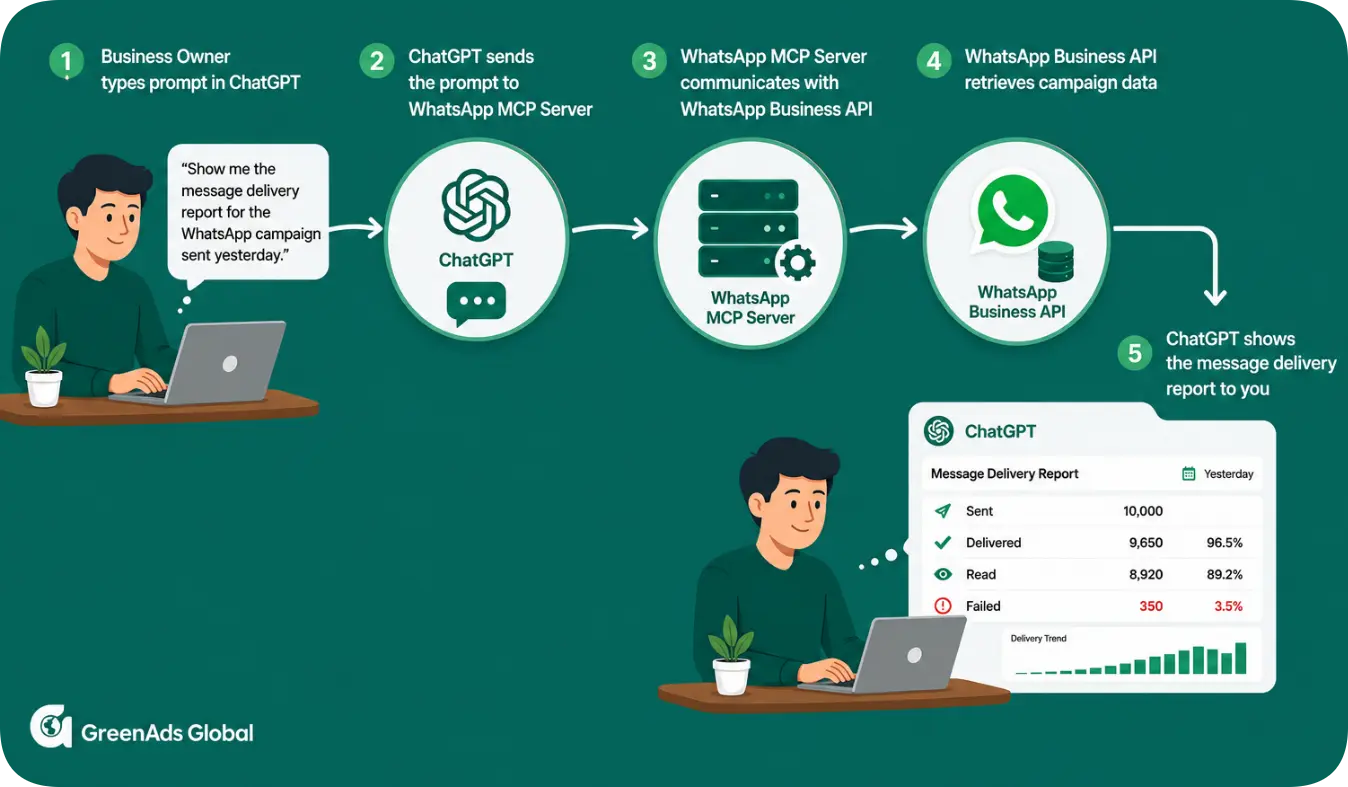
“Show me the message delivery report for the WhatsApp campaign sent yesterday.”
The AI assistant sends this prompt to the WhatsApp MCP Server and communicates with the WhatsApp Business API. The WhatsApp Business API retrieves the campaign data.
Once the details are retrieved, the MCP Server passes this data to the AI assistant, which converts it into a message delivery report, which can be read by you.
3. How Can an AI Assistant Manage Your WhatsApp Business API?
As a WhatsApp API provider for AI automation, our WhatsApp MCP Server connects ChatGPT, Claude and other AI assistants directly to your WhatsApp Business API account allowing them to perform business messaging tasks through simple prompts given by you.
From campaign management and customer contact management to delivery reports and workflow automation, the AI assistant can complete these tasks in seconds, omitting the need to perform these tasks manually.
4. Why Choose GreenAds WhatsApp MCP Server?
The answer is simple - as a WhatsApp API provider for AI automation, GreenAds Global enables your AI assistant to do much more than answer questions. With the GreenAds WhatsApp MCP Server, AI assistants can execute real WhatsApp Business API actions through prompts, helping your team reduce manual work and save time.
- No custom API coding required - simply connect your AI assistant and start prompting to automate business tasks.
- Works with ChatGPT, Claude and other AI assistants through a simple 5-minute integration.
- Turns simple prompts into WhatsApp Business API actions, making it easy to create WhatsApp broadcasts, manage contacts, retrieve reports and reduce manual effort.
- Supports end-to-end WhatsApp workflows, from campaign creation and audience management to reporting and analytics, acting as an AI-powered automated marketing tool.
- Scale your customer communication effortlessly as your business grows, enabling high-volume WhatsApp broadcasts without increasing manual work.
The result is a faster, more intuitive way to manage your WhatsApp Business API.
[[cta]]
5. Is the WhatsApp MCP Server Secure?
The WhatsApp MCP Server is designed with security and responsible AI usage at its core. All actions require human approval by default, ensuring complete control and compliance. Combined with the WhatsApp Business API's encryption, customer opt-in requirements and Meta's messaging policies, this helps businesses automate communications securely and responsibly.
6. Getting Started with GreenAds MCP Server
So far, we've focused on the WhatsApp MCP Server. However, many businesses don't communicate with customers on WhatsApp alone. They also use SMS and RCS for marketing campaigns and customer engagement.
That's where the GreenAds Telinfy platform comes in. It brings together WhatsApp Business API, SMS and RCS into a single messaging platform.
The GreenAds Telinfy MCP Server extends the same automation capabilities beyond WhatsApp to SMS and RCS, allowing AI assistants to manage messaging across all three channels from a single interface.
Getting Started:
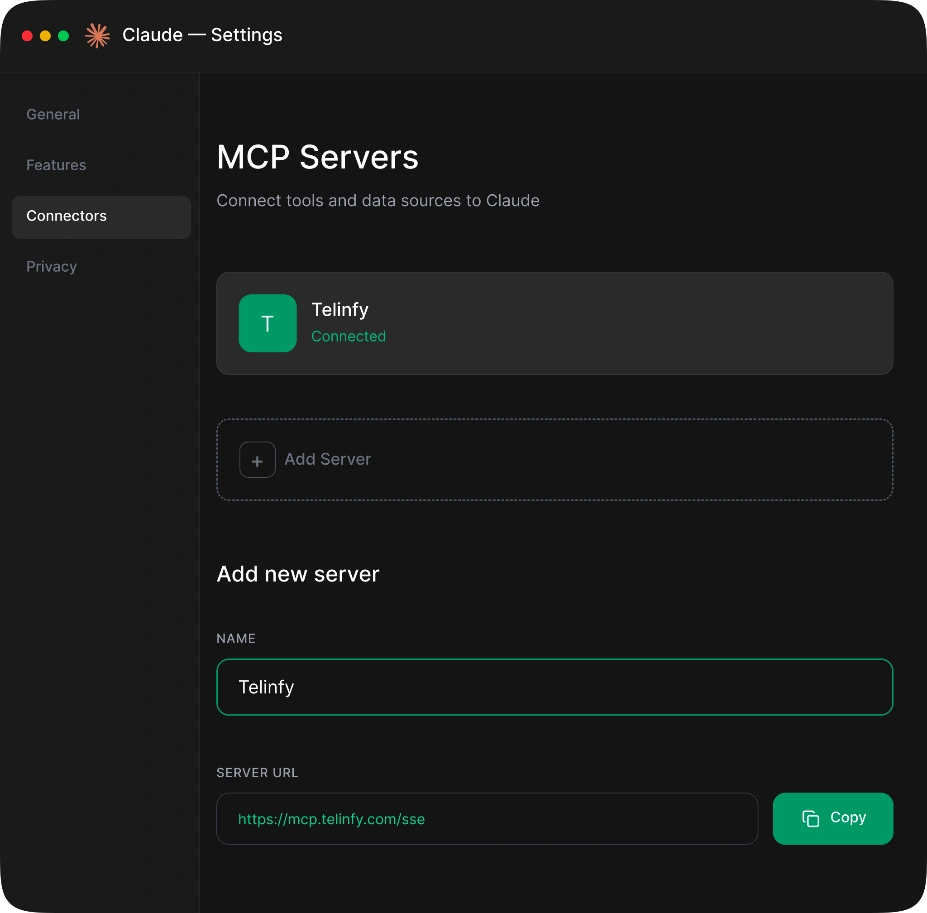
Connecting your AI assistant to the GreenAds Telinfy platform takes less than 5 minutes.
- Open Claude or ChatGPT.
- Navigate to Settings --> Connectors.
- Click “Add Custom Connector”.
- Enter the GreenAds Telinfy MCP Server URL: https://mcp.telinfy.com
- Save the connector.
Your AI assistant is now connected and ready to manage messaging tasks through the Telinfy platform.
7. Conclusion:
As AI becomes an integral part of business operations, simply having access to the WhatsApp Business API is no longer enough. With a WhatsApp MCP Server, AI assistants can securely perform business actions through simple natural language prompts, reducing manual work while maintaining complete control.
With GreenAds Telinfy MCP Server, you can manage WhatsApp, SMS and RCS campaigns contacts, analytics and workflows from a single AI interface - helping your team communicate faster, work smarter and scale effortlessly.
[[cta]]
₹ 899
₹ 2,249
₹ 3,149
$30
$50
Frequently Asked Questions
1. What is a WhatsApp MCP server?
A WhatsApp MCP (Model Context Protocol) Server connects AI assistants like ChatGPT or Claude to the WhatsApp Business API, enabling them to directly automate business tasks through simple prompts. This way, AI assistants can directly create campaigns, send bulk approved WhatsApp messages, manage contact lists, schedule broadcasts and retrieve delivery reports automatically.
2. Is GreenAds MCP secure for business automation?
Yes. GreenAds MCP uses authentication and permission-based access to ensure AI assistants perform only authorized actions. Businesses maintain full control over connected systems and user permissions.
3. What are the benefits of using GreenAds MCP server for business automation?
GreenAds Global is a WhatsApp API provider for AI automation that enables businesses to connect AI assistants with WhatsApp messaging through the GreenAds MCP Server. Businesses can automate campaigns, manage contacts, schedule broadcasts and retrieve reports using simple prompts, helping reduce manual work and improve productivity.
Does the GreenAds MCP server support multiple languages?
Yes. GreenAds MCP is compatible with Claude, ChatGPT or any AI assistant, which support multilingual interactions, allowing users to execute tasks and communicate with customers in their preferred language.
5. What AI marketing tools does GreenAds MCP provide?
GreenAds MCP enables AI assistants to send bulk SMS messages, launch WhatsApp or RCS campaigns, schedule broadcasts, manage contact lists and retrieve delivery reports—all from a single prompt.
6. Does connecting to the GreenAds MCP server require coding?
No, it does not require coding. Simply open your Claude or ChatGPT settings, go to Connectors and add the GreenAds MCP server URL (https://mcp.telinfy.com). Once saved, your AI assistant is connected to your WhatsApp, SMS and RCS platform. The entire setup takes less than 5 minutes.
7. Which AI platforms work with GreenAds MCP server?
GreenAds Telinfy MCP is compatible with Claude, ChatGPT and any AI assistant. Once connected, these AI assistants can securely interact with your configured business messaging platform to automate workflow tasks.
8. What is an AI messaging campaign?
An AI messaging campaign is when you use an AI assistant like ChatGPT or Claude to send bulk WhatsApp, SMS, or RCS messages — just by typing a simple instruction. Instead of logging into a dashboard and setting up campaigns manually, the AI handles everything for you. It's faster, easier, and works at scale.
9. Can AI assistants create and manage WhatsApp marketing tasks?
Yes. With GreenAds Global as your WhatsApp API provider for AI automation, AI assistants can function as a WhatsApp bulk message sender, enabling businesses to create, schedule and manage WhatsApp campaigns using simple natural language prompts.
For example, "Send an SMS campaign named 'April Promo' to 9876543210 using sender ID TELNFY, route type 1 (transactional), with message 'Your order #1234 has been shipped' and DLT template ID 1107161234567890." or "Show me the delivery report for the WhatsApp campaign sent yesterday."
10. Which businesses benefit most from AI-powered marketing automation?
Businesses that manage high volumes of customer communication benefit the most, including e-commerce, retail, healthcare, banking, education, travel, logistics, real estate and customer support teams.
You may Also like
Book a One-to-One Meeting With Our Product Expert
Have questions? We have got answers! Connect with our product expert for a personalized demo session and discover the best messaging solutions for your business.
.svg)
